GitHub Copilot
Antenna automatically tracks AI coding metrics from the GitHub Copilot usage APIs, giving you insight into adoption, activity, and the impact of AI tools on your team’s productivity.
Connection methods
Connect your GitHub account to enable Copilot metrics. How you connect depends on where you do your Git hosting:
- If you use GitHub for source control, installing our GitHub App is sufficient. The App uses OAuth and does not expire, and it also enables productivity metrics in Antenna.
- If you use another Git provider (e.g., Azure DevOps, Bitbucket, or GitLab) and manage Copilot licenses through GitHub Enterprise, connect using a GitHub Enterprise Personal Access Token (PAT) so we can access Copilot usage via the Enterprise APIs.
Important notes:
- Billing and seat utilization: With the GitHub App, this data comes from your GitHub Organization. With a GitHub Enterprise PAT, Antenna reads seat assignments and seat types from your enterprise, so you don’t need a GitHub Organization.
- Team data: If you have a GitHub Organization, we sync your GitHub Teams to help with analysis. We do not currently sync teams from the Enterprise level.
- Per-user enterprise AI credit usage: If your organization is part of a GitHub Enterprise, you must also connect a PAT to access per-user AI credit usage data. GitHub blocks user-level filtering for enterprise-owned organizations when using a GitHub App. The PAT needs the optional
manage_billing:copilotscope for this data, and the PAT owner must be an enterprise admin or billing manager.
Connecting via GitHub App
If you use GitHub, we recommend installing our GitHub App when you create your Antenna organization. The connection is handled via OAuth and does not expire.
Connecting via Personal Access Token (PAT)
Use this method when your team uses a different Git provider (Azure DevOps, Bitbucket, GitLab) and you manage Copilot through GitHub Enterprise.
Enable Copilot usage metrics in your enterprise or organization
Copilot usage metrics are disabled by default. An admin must enable them. The steps vary depending on whether you manage Copilot at the enterprise or organization level.
For enterprises:
Example: github.com/enterprises/{your_enterprise_slug}/ai-controls/copilot.
- On github.com , open the AI Controls tab.
- Select Copilot in the left sidebar.
- In the Metrics section, enable Copilot metrics API and Copilot usage metrics.
For organizations:
Example: github.com/organizations/{your_org_slug}/settings/copilot/policies.
- On github.com , go to Settings > Copilot > Policies.
- Enable Copilot metrics API and Copilot usage metrics.
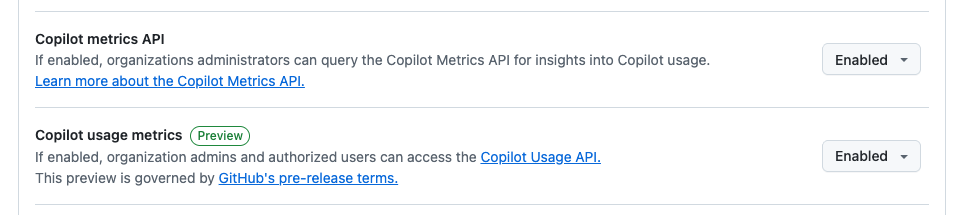
This turns on the Copilot APIs for your enterprise so administrators and billing managers can access usage and adoption data.
Create a PAT with the required scopes
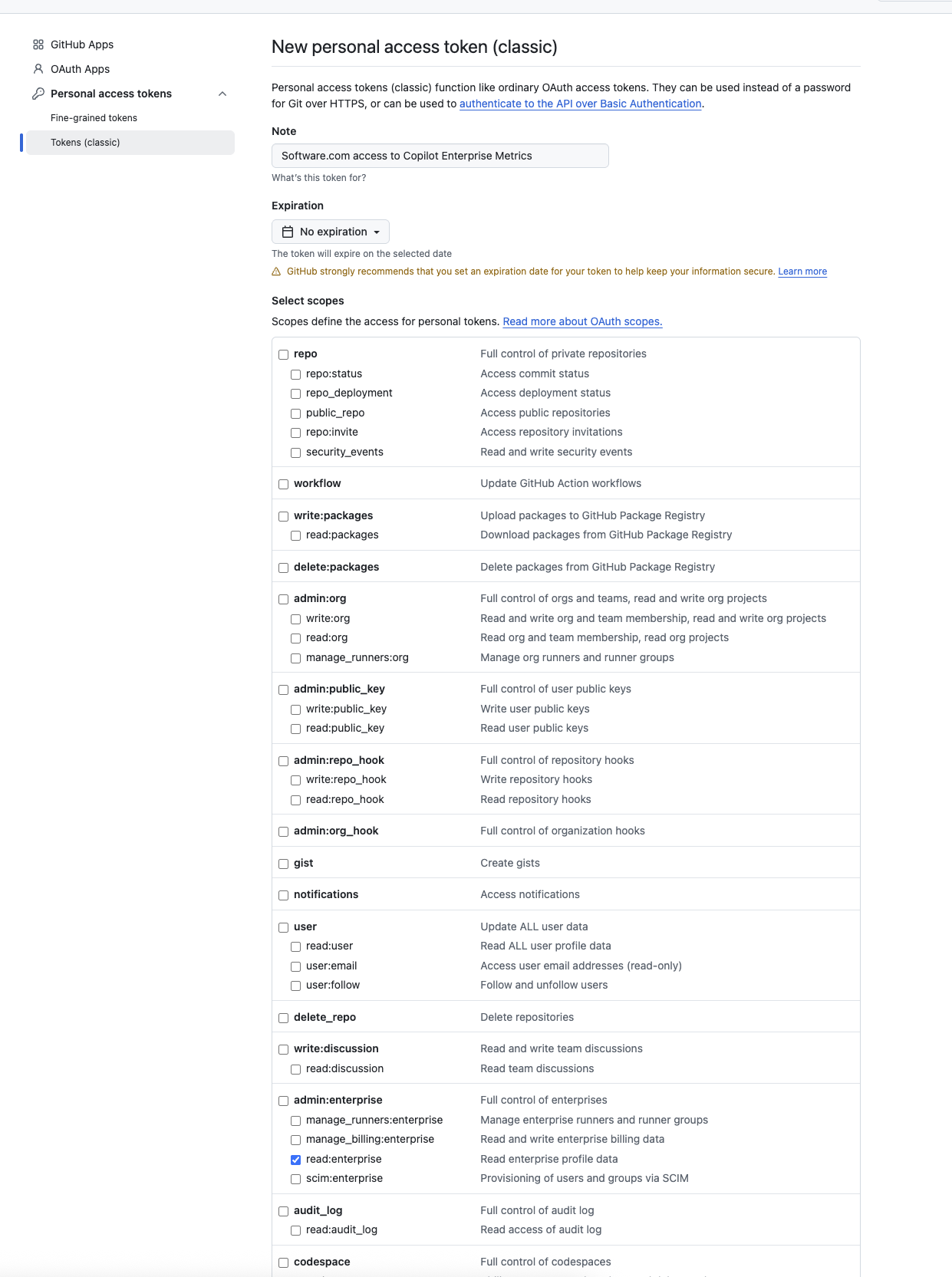
The user who connects must be an enterprise owner or billing manager. Create a PAT (Classic) with:
- read:enterprise – Read-only access to enterprise-level data. Covers Copilot usage metrics and seat assignments.
- read:user – Read-only access to user profile data, used to match Copilot users to people in Antenna.
Optional scopes:
- manage_billing:copilot – Adds per-user AI credit spend. GitHub also lets this scope add and remove Copilot seats, but Antenna only reads data and never changes seats. Leave it off to keep the token read-only; everything except AI credit spend still works.
- manage_billing:enterprise – Lets Antenna write AI Budgets limits to GitHub.
The Create Personal Access Token button in Antenna pre-selects both optional scopes. For a read-only token, untick them before you click Generate token.
See GitHub OAuth scopes for more detail.
Connect in the Antenna app
- In Antenna, go to Settings > Sources > Add source.
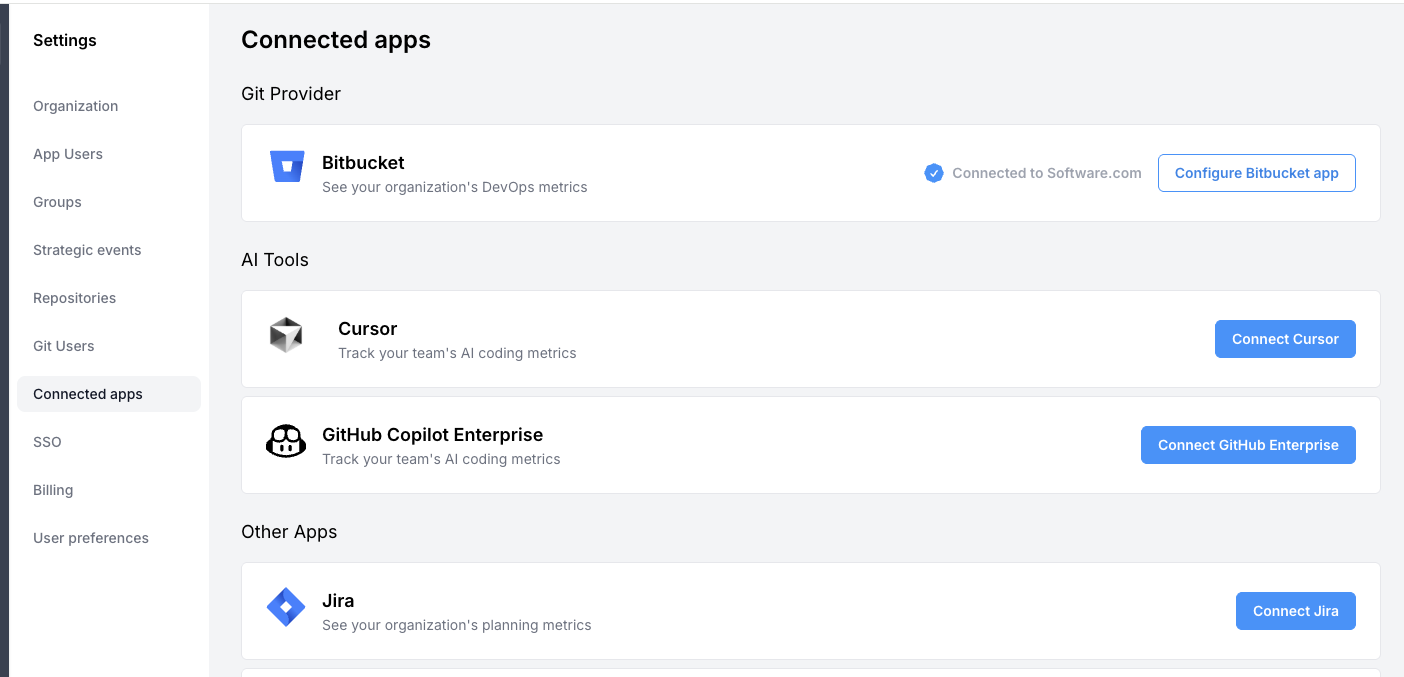
- Find GitHub Copilot Enterprise and click Connect.
- Paste your PAT. Set an expiration (e.g., 1 year) and add a reminder to refresh it before it expires.
- Enter your Enterprise Slug (the unique name in your GitHub URL:
github.com/enterprises/YOUR-SLUG). It must match an enterprise you can access.
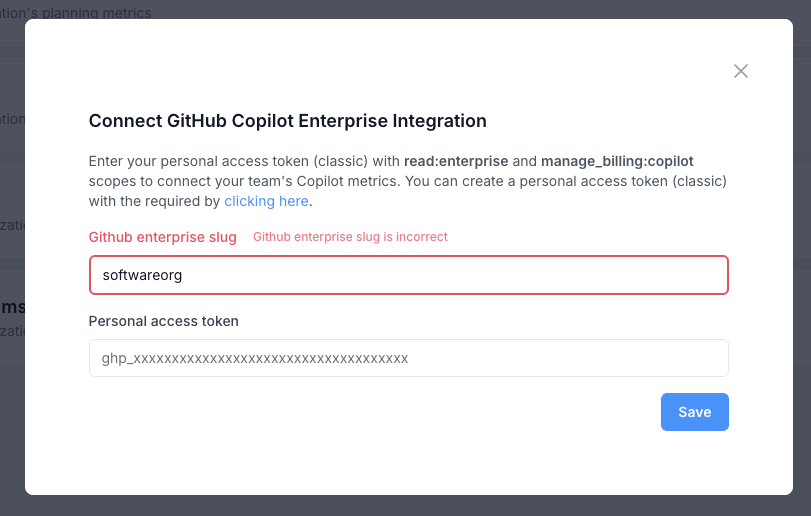
- Click Save to complete the connection.
Data collected
We use read-only access to the following GitHub Copilot APIs:
Organization APIs
| Purpose | Endpoint |
|---|---|
| Seat assignments | GET /orgs/{org}/copilot/billing/seats |
| Billing summary | GET /orgs/{org}/copilot/billing |
| Per-user usage (daily) | GET /organizations/{org}/copilot/metrics/reports/users-1-day |
| Per-user AI credit usage | GET /orgs/{org}/settings/billing/ai_credit/usage |
Enterprise APIs
| Purpose | Endpoint |
|---|---|
| Seat assignments | GET /enterprises/{enterprise}/copilot/billing/seats |
| Per-user usage (daily) | GET /enterprises/{enterprise}/copilot/metrics/reports/users-1-day |
| Enterprise-level usage (28-day) | GET /enterprises/{enterprise}/copilot/metrics/reports/enterprise-28-day/latest |
| Per-user AI credit usage | GET /enterprises/{enterprise}/settings/billing/ai_credit/usage |
For full parameter and response details, see the Copilot usage metrics API .