Claude.ai Team, Pro, and Max
Claude.ai Team, Pro, and Max plans have no usage or analytics API. Antenna uses Claude Code’s OpenTelemetry metrics instead. You set them up once in your organization’s managed settings.
Setup
Copy settings.json
On app.antenna.dev, go to Settings > Sources > Add source, find Claude Code, click Connect, select Claude.ai Team / Pro / Max, and copy the snippet.
{
  "env": {
    "CLAUDE_CODE_ENABLE_TELEMETRY": "1",
    "OTEL_METRICS_EXPORTER": "otlp",
    "OTEL_EXPORTER_OTLP_PROTOCOL": "http/json",
    "OTEL_EXPORTER_OTLP_METRICS_ENDPOINT": "https://app.antenna.dev/api/v1/otel/claude/metrics",
    "OTEL_EXPORTER_OTLP_HEADERS": "Authorization=Bearer your_token",
    "OTEL_METRIC_EXPORT_INTERVAL": "3600000"
  }
}
Update Claude managed settings
Go to Organization Settings > Claude Code in Claude.ai, paste in the JSON payload, and click Update Settings.
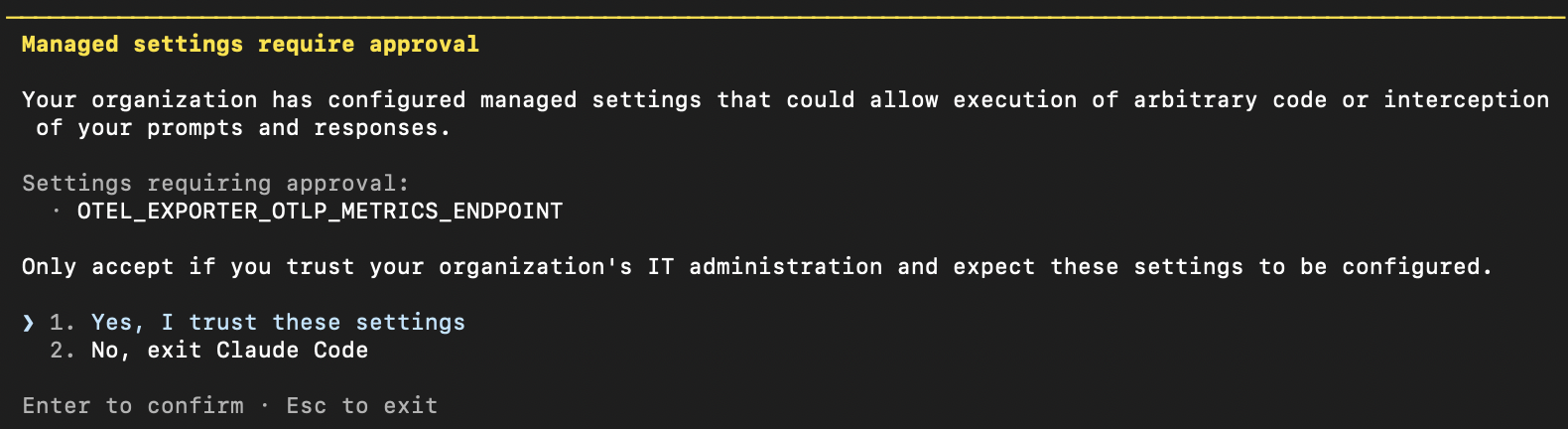
The next time developers sign in to Claude Code with their subscription, they see “Managed settings require approval”. They have to accept the settings to keep using Claude Code. Accepting updates the ~/.claude/settings.json file in each user’s home directory.
Other important notes:
- You must be an Owner to update managed settings.
- Managed settings take precedence over a developer’s local or repo-level
.claude/settings.json. Any OpenTelemetry endpoints configured there are replaced. If you already send telemetry to another backend, see Send to Antenna and another backend. - For more detail on how to configure your settings file, see Claude Code settings .
There are various options for propagating settings.json (e.g. MDM / device management, dotfiles repository, shell profile / RC files, and onboarding scripts). If available, MDM / device management is the most reliable method for org-wide enforcement.
What’s tracked
OpenTelemetry covers Claude Code wherever it reads your managed settings:
| Claude surface | Tracked | service.name |
|---|---|---|
| Claude Code CLI (terminal and IDE extensions) | Yes | claude-code |
| Claude Desktop app, Code tab | Yes | claude-code-desktop |
| Claude Desktop app, Cowork tab | Partially, see below | cowork |
| Claude Desktop app, Chat tab, and claude.ai on the web | No | n/a |
Code tab: the Code tab in Claude Desktop runs Claude Code, reads the same managed settings, and sends the same metrics as the CLI. Antenna combines CLI and Desktop usage into each developer’s Claude activity, so you don’t need to change anything. If you filter Claude telemetry by service.name in your own collector or dashboards, include both claude-code and claude-code-desktop. See Service information in Claude’s documentation.
Cowork tab: Cowork doesn’t use Claude Code managed settings. It’s configured separately in Admin settings > Data and privacy > Monitoring (see Cowork monitoring ). Antenna counts Cowork data only when it arrives as Claude Code metrics. Claude doesn’t document that it does, so treat Cowork coverage as best-effort.
Chat: Claude doesn’t export OpenTelemetry for chat conversations, so they don’t appear in Antenna.
Cost data
Claude.ai has no billing API, so the cost reported for this source is Claude Code’s own estimate: the claude_code.cost.usage metric. Claude Code calculates it on each developer’s machine from token counts and model list prices. Claude’s documentation says cost metrics are approximations and points to your billing provider for official figures.
The estimate:
- Covers usage-based spend in Claude Code only (CLI and the Desktop Code tab).
- Uses list prices, so plan discounts, credits, and included usage are not taken into account.
- Doesn’t include Chat, Cowork, or Office agent usage.
Seat fees aren’t part of the estimate. Antenna adds them from the seat price you set: go to AI Budgets > Configure Budgets and set Avg seat cost for Claude in Tool Defaults. Total Claude cost in Antenna is your seat cost plus the estimated usage cost.
If you need actual spend instead of the estimate, you can upload your actual costs.
Send to Antenna and another backend
Claude Code sends each OpenTelemetry signal (metrics, logs) to a single endpoint. If you already send Claude Code telemetry to a backend such as New Relic or Datadog, pick one of these setups.
Option 1: Fan out through an OpenTelemetry Collector
Use this if your existing backend also needs Claude Code metrics. Point Claude Code at your own OpenTelemetry Collector and have the collector export metrics to both destinations.
- In your managed settings, set the OTLP endpoint to your collector instead of Antenna.
- Add Antenna as an extra exporter, using the token from your Antenna snippet:
exporters:
  # ... your existing exporters, for example:
  otlphttp/newrelic:
    endpoint: https://otlp.nr-data.net
    headers:
      api-key: YOUR_NEW_RELIC_LICENSE_KEY

  # Antenna, metrics only
  otlphttp/antenna:
    metrics_endpoint: https://app.antenna.dev/api/v1/otel/claude/metrics
    compression: none
    encoding: json
    headers:
      Authorization: "Bearer your_token"

service:
  pipelines:
    metrics:
      receivers: [otlp]
      processors: [batch]
      exporters: [otlphttp/newrelic, otlphttp/antenna]
    logs:
      receivers: [otlp]
      processors: [batch]
      exporters: [otlphttp/newrelic]
Antenna accepts metrics only, so leave otlphttp/antenna out of your logs and traces pipelines.
Option 2: Split signals without a collector
Use this if your existing backend only needs logs or traces. Claude Code accepts a separate endpoint, protocol, and headers for each signal, so you can send metrics to Antenna and logs to your other backend:
{
  "env": {
    "CLAUDE_CODE_ENABLE_TELEMETRY": "1",
    "OTEL_METRICS_EXPORTER": "otlp",
    "OTEL_EXPORTER_OTLP_METRICS_ENDPOINT": "https://app.antenna.dev/api/v1/otel/claude/metrics",
    "OTEL_EXPORTER_OTLP_METRICS_PROTOCOL": "http/json",
    "OTEL_EXPORTER_OTLP_METRICS_HEADERS": "Authorization=Bearer your_token",
    "OTEL_METRIC_EXPORT_INTERVAL": "3600000",
    "OTEL_LOGS_EXPORTER": "otlp",
    "OTEL_EXPORTER_OTLP_LOGS_ENDPOINT": "https://otlp.nr-data.net/v1/logs",
    "OTEL_EXPORTER_OTLP_LOGS_PROTOCOL": "http/protobuf",
    "OTEL_EXPORTER_OTLP_LOGS_HEADERS": "api-key=YOUR_NEW_RELIC_LICENSE_KEY"
  }
}
Don’t set OTEL_EXPORTER_OTLP_HEADERS in this setup. Claude Code merges it into every signal’s headers, so each backend would receive the other’s credentials.
With either option, put the final configuration in your Claude managed settings. Managed settings replace any OpenTelemetry endpoints developers set locally.
Data collected
We receive metrics every hour, such as sessions, lines added, commits, pull requests, tokens, estimated cost, and active time. For full details on what Claude Code sends, see Monitoring usage in Claude Code’s OpenTelemetry documentation.
We do not collect logs (for example, prompts). Only aggregated metrics are sent.
Appendix: Upload your actual costs
To use actual spend instead of the cost estimate, upload a monthly cost per member. For each member and month you upload, Antenna uses that figure in place of the estimate.
Export the spend report from Claude.ai
An Owner or Primary Owner exports it from Settings > Analytics on claude.ai. Scroll to How much is Claude costing? and click Export spend report. Choose Last Month, or a custom range covering a single calendar month. The report sums spend over the whole range it covers, so Antenna can’t split a multi-month range by month. Upload one export per month.
Upload it in Antenna
On app.antenna.dev, go to Settings > Sources, click Configure on the Claude source, then click Upload costs (CSV). Pick the month the export covers and drop in the file as it comes from claude.ai. You don’t need to edit it.
The export has one row per member, per product, per model. Antenna keeps only the Claude Code rows, so spend on Chat, Cowork, and the Office agents doesn’t inflate Claude Code’s cost. It then sums each member’s remaining rows into one monthly cost using Total Net Spend USD, the amount after any discounts or credits.
Members are matched by email to the Claude Code user reporting OpenTelemetry metrics. Anyone who hasn’t sent metrics yet is reported as unmatched.
Or build the CSV yourself
If your spend numbers come from somewhere other than the Claude.ai export, any CSV with a member email, a month, and a cost works:
Email,Month,Cost
alex@acme.com,2026-06,142.50
jordan@acme.com,2026-06,87.25
Headers are matched case-insensitively and accept common aliases (e.g. Email Address, Billing Month, Amount). A Month column overrides the month picked in the upload modal, and rows for the same member and month are summed. The modal links an example CSV.
Antenna spreads each member’s monthly cost across their Claude Code usage days in proportion to the estimated cost, so daily and weekly views add up to the monthly total. You can upload a month again at any time; the newest upload for a member and month replaces the previous one.