Product Updates
✨ Microsoft 365 Copilot Integration
ReleaseOctober 9, 2026Connect Microsoft 365 Copilot to track Copilot adoption and prompt activity per person alongside your other AI tools, priced as a seat-based tool.
Connect planning to delivery with Linear
ReleaseSeptember 29, 2026Antenna now supports Linear, connecting the work your team plans with the code it ships. Link Linear issues to pull requests to bring planning and delivery into one view.
Connect your workspace from Settings > Sources. One connection covers every team in your Linear workspace. See the setup guide to get started.
✨ Okta Directory Integration
ReleaseSeptember 18, 2026Sync people and groups into Antenna from Okta. Identities and identity groups stay current with your directory, and enterprise admins choose which Okta groups become identity groups. Antenna is now published in the Okta Integration Network .
✨ OpenRouter Integration
ReleaseSeptember 17, 2026Connect OpenRouter as a data source to see organization-wide AI usage across every model your teams route through it, including spend and token usage per developer.
✨ AI Budgets
ReleaseBetaSeptember 17, 2026Set a budget per AI tool, per developer, or per group. Budgets are seeded from the spend caps your vendors already report, so you can start with sensible defaults.
With AI Budgets you can:
- Track budget utilization through the month, along with projected utilization
- See who is on pace to go over and which tools they’re spending the most on
- Switch between monthly and annual views for planning
- Get a daily email digest that flags the people on pace to exceed their budgets
✨ Model Selection Planner
ReleaseSeptember 14, 2026Compare models on productivity vs. cost and identify opportunities for cost savings. Determine the optimal mix of tools, models, and frontier usage.
With the model selection data you can:
- Compare productivity and cost by model
- Break out frontier models, like Fable and Astra, to see their usage and impact
- Drill into per-user breakdowns by frontier spend, model, tool, reasoning, and speed
- Plan scenarios to understand how swapping between models affects cost and productivity
✨ ChatGPT Enterprise Integration
ReleaseSeptember 9, 2026Connect ChatGPT Enterprise to bring workspace AI usage into Antenna. A single OpenAI connection now covers both ChatGPT and Codex, so usage data for both tools is available from one integration.
📝 Developer Surveys
ReleaseAugust 20, 2026Run surveys from a template and share a public page respondents can complete without logging in. Two templates are available:
- Engineering Pulse — a short, recurring check on how developers experience day-to-day software development, scored across dimensions like productivity, focus, and well-being.
- AI Lift — measures whether AI is changing what employees can accomplish, scored across dimensions like efficiency, quality, capability, and overall value. It’s designed to apply to anyone in the company, not just software developers.
Results roll up by dimension, so you can compare scores across your organization and track them from one survey to the next.
🚀 DORA Four Keys, with PagerDuty
ReleaseAugust 14, 2026The new DORA page tracks the four keys: deployment frequency, lead time for changes, change failure rate, and time to restore service. Each metric includes trend charts and tier bands, along with clickable drilldowns to the deployments and pull requests behind every number.
You can now connect PagerDuty to feed your incident data into your DORA metrics, so change failure rate and time to restore service are read directly from your incidents. By default, Antenna estimates MTTR from your Git data.
✨ Gemini for Workspace Integration
ReleaseAugust 8, 2026Connect Gemini for Workspace to track daily Gemini activity per developer alongside your other AI tools, priced as a seat-based tool.
✨ Devin Integration
ReleaseAugust 7, 2026Connect Devin as an enterprise data source. Devin users sync into your identities, and daily ACU consumption is tracked per service user, bringing agent spend and output into the same AI reporting as your other tools.
🛠️ Smarter Contributor Attribution for Planning Issues
ImprovementJuly 24, 2026We’ve improved how completed planning issues are credited to developers so that your planning metrics reflect who actually did the work.
Previously, each issue was attributed to its last assignee—whoever happened to hold the issue when it was closed. Because issues are often reassigned as they move through stages (development, review, QA, close), the last assignee isn’t always the person who did the work. Now we identify a primary contributor for each issue using the full assignment history and supporting signals, including:
- Who held the issue while it was in progress (and for how long)
- Who authored a linked pull request
- Who moved the issue through its key stages
This applies across both Jira and Azure DevOps, which both track assignment changes over time.
What you’ll notice:
- Completed-issue credit now lands with the developer who did the work, not just the final assignee.
- Issues that previously had no attributed developer are now correctly credited.
- No issue loses its attribution—this change only adds or redistributes credit.
🛠️ Improved AI Engagement Accuracy
ImprovementMay 18, 2026We’ve refined our algorithm on AI engagement to give you a more accurate look at long-term adoption.
Instead of marking users inactive the moment they pause their AI tool usage—which can inflate day-to-day metrics—we now track active users across a 14-day rolling window from their last engagement.
You’ll now see much more stable, accurate engagement rates, especially for teams with shifting AI tool usage.
✨ Software.com is now Antenna
AnnouncementApril 15, 2026We’re excited to share that Software.com is now Antenna. This change reflects both an improvement and a sharper articulation of our mission.
Antenna is the control plane for AI-driven software development. As AI transforms how software is built, companies face new challenges:
- Rising AI platform costs vs. development headcount
- Unclear productivity gains from AI adoption
- Bottlenecks that prevent AI from delivering real impact
Antenna provides a system-level view across teams, agents, and workflows—helping you:
- Measure true productivity (including AI developer equivalents)
- Identify bottlenecks limiting AI-driven output
- Surface improvement opportunities
- Make better financial and operational decisions as AI adoption scales
AI platforms are evolving rapidly. Antenna gives you the visibility and control to navigate that transformation with confidence.
For details on what’s changing and what to update, see the Domain Transition Guide.
✨ ADO Pull Request Comments
FixFebruary 18, 2026We’ve refined how Time to First Review is measured for Azure DevOps pull requests.
Some historical comments were not being counted toward the first review timestamp. The first review timestamp now includes all timeline reviews and comments so that your Lead Time for Azure DevOps will reflect first review more accurately.
You may see a small shift in your Time to Review, Time to Approve, and Lead Time metrics for Azure DevOps as historical data is recalculated.
For more on how these stages are measured, see our Lead Time documentation.
🛠️ Time to Develop Metric Enhancements
ReleaseOctober 27, 2025We’ve rolled out an update to ensure that your Time to Develop metric more accurately reflects the active development time for the work being shipped. It provides a cleaner signal by removing the noise from routine branch management and code integration tasks.
Our refined algorithm filters out unrelated commits from actions like changing a base branch or merging in hotfixes. Each commit is now only associated with a single pull request and will be excluded from the calculation if it meets any of the following conditions:
- It was already part of a merged PR. This filters out standard merge commits and commits from other branches (e.g. a hotfix) that were merged into the feature branch before the PR was completed.
- It results from a base branch change. We ignore commits that are temporarily added to a PR’s history when its base branch is changed, ensuring only commits relevant to the final base branch are included.
- The author and committer are different. This excludes commits that were authored by another developer and introduced into the branch history through actions like cherry-picking.
These changes are detailed in our documentation. If you have any questions, please reach out to us at support@antenna.dev.
✨ Abandoned PRs
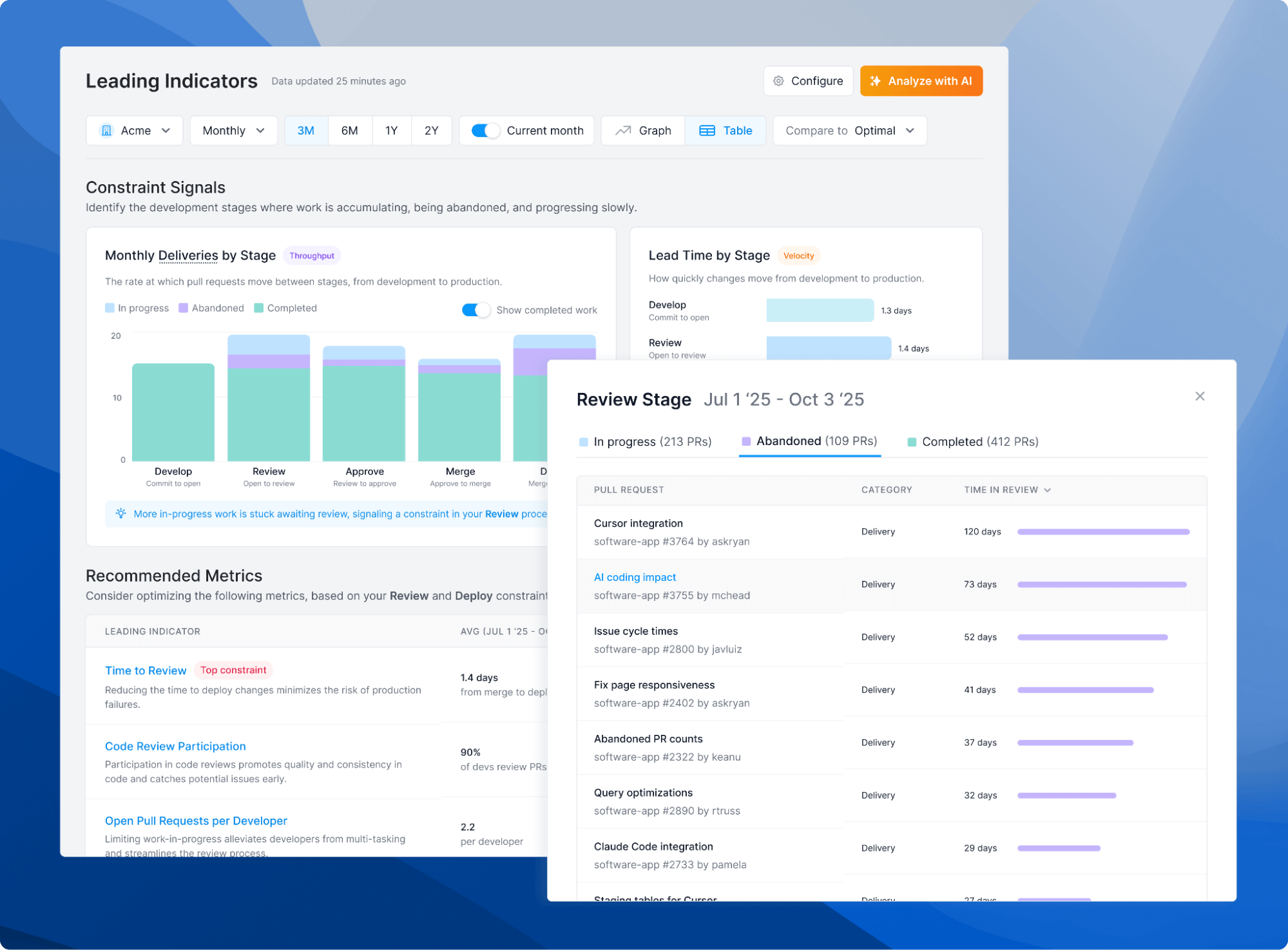
ReleaseOctober 3, 2025On Leading Indicators, we automatically flag the stage where uncompleted work is piling up to indicate where there is a traffic jam in your process. We’ve rolled out three key refinements to how we visualize work in progress:
- Separation of Abandoned PRs: We now separate abandoned work, giving you a cleaner view of your team’s in progress work and making it easier to visualize your most constrained stage.
- Improved Abandoned Threshold: The threshold for marking a PR as abandoned has been increased from 30 to 90 days to better account for long-running but still relevant work.
- Completed Work Toggle: We’ve added a toggle to show completed work for historical context. By default, completed work is not shown.
- Consistent Group Attribution: We’ve improved attribution of abandoned PRs to groups where the member who authored the PR is no longer part of a group.
🔐 Updated Roles and Permissions
ReleaseSeptember 9, 2025We’ve released an important update to our roles and permissions model, giving you more granular control over who can access and manage different parts of your organization.
This update introduces four distinct roles—Contributor, Manager, Director, and Admin—each with a clear scope of permissions across features and settings. Contributors are limited to read-only access, Managers can edit groups and manage their teams, Directors can create comparisons and view cost data, and Admins retain full access across the platform.
As part of this change, existing users with the Member role will automatically become Contributors, while existing Admins will remain Admins. Members who previously had access to Comparisons and cost data will be transitioned to the Director role. Going forward, all new users will default to the Contributor role.
If you’re an Admin, we recommend reviewing your team’s role assignments. Members who previously managed groups and repositories will now need to be promoted to Manager to retain those permissions.
We’ve also added group-based access controls. By default, users can access all groups, but Admins can now assign specific groups to Contributors and Managers to limit what data they can view and manage.
These changes provide better alignment with how organizations structure their teams and ensure sensitive data is only accessible to the right roles.
You can learn more about the updated roles and permissions in our documentation. If you have any questions, please reach out to us at support@antenna.dev.
🔄 Refined Review Cycles Calculation
ImprovementAugust 6, 2025We’ve refined our algorithm for Code Review Cycles to provide a clearer signal on the back-and-forth context switches between authors and reviewers.
With the rise of AI code review tools, developers should not see their metrics negatively impacted for using modern tools that help them improve code quality before human review. For this reason, we’ve made an update to exclude reviews from bots from the calculation.
We’ve made several other refinements, such as excluding reviews and comments by the pull request’s author, reviews that happen before a pull request is marked as ready for review (i.e., taken out of “Draft” status), and reviews from open source contributors.
With these changes, you may see a decrease in the Review Cycles reported for some pull requests. This adjustment applies historically, ensuring that your trends remain consistent while improving the overall accuracy of the metric. The result is a more precise and actionable measure for understanding and improving review efficiency.
You can learn more about how we calculate Review Cycles in our updated documentation. If you have any questions, please reach out to us at support@antenna.dev.
🔄 GitHub Branch Protection Rules
ImprovementAugust 6, 2025Based on your feedback, we’re improving the accuracy of our Time to Approve metric to better reflect multi-step approval workflows. This update now incorporates the required number of approvals you’ve configured in your GitHub Branch Protection rules.
Previously, Time to Approve was measured from the first review to the first approval. Now, the clock stops only when the number of required approvals for a pull request has been met. This update also refines the start time for Time to Merge, which now begins after the final required approval is received. As a result, you may see an increase in this metric for PRs that require multiple reviewers.
This improved calculation is currently available for GitHub only. We are actively working on building out support for GitLab, Bitbucket, and Azure DevOps and will share updates as they become available.
You can learn more about how we calculate the stages of Lead Time in our updated documentation. If you have any questions, please reach out to us at support@antenna.dev.
🪆 Group Hierarchy and Smarter Member Tracking
ReleaseAugust 4, 2025We’ve added support for nesting groups within groups, allowing you to more easily visualize data according to your organization’s structure. Changes to child groups will be reflected in parent groups, reducing the time required to manage and update groups.
Here’s a quick overview of the improvements you’ll see across the platform:
Nested Group Filter The group filter is now organized by group hierarchy, allowing you to navigate through groups according to your organization’s structure.
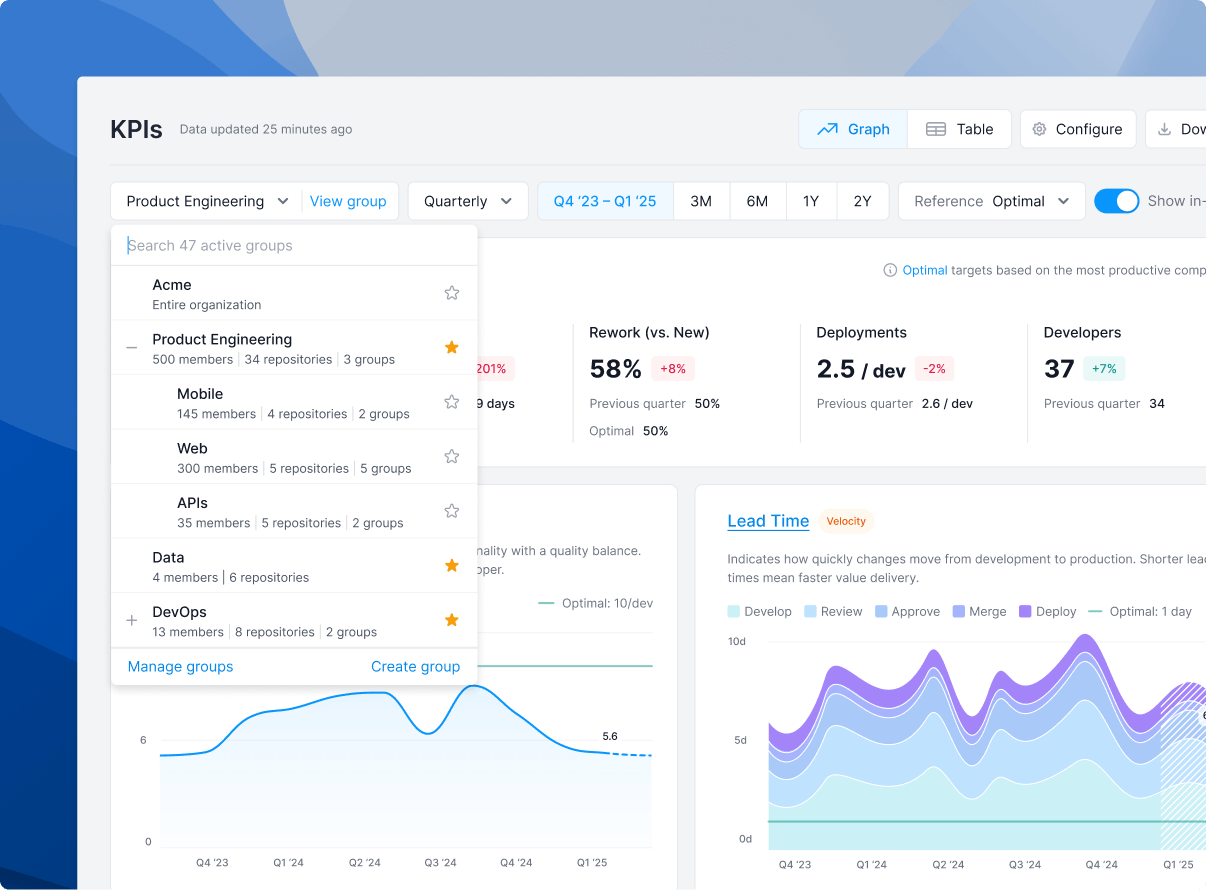
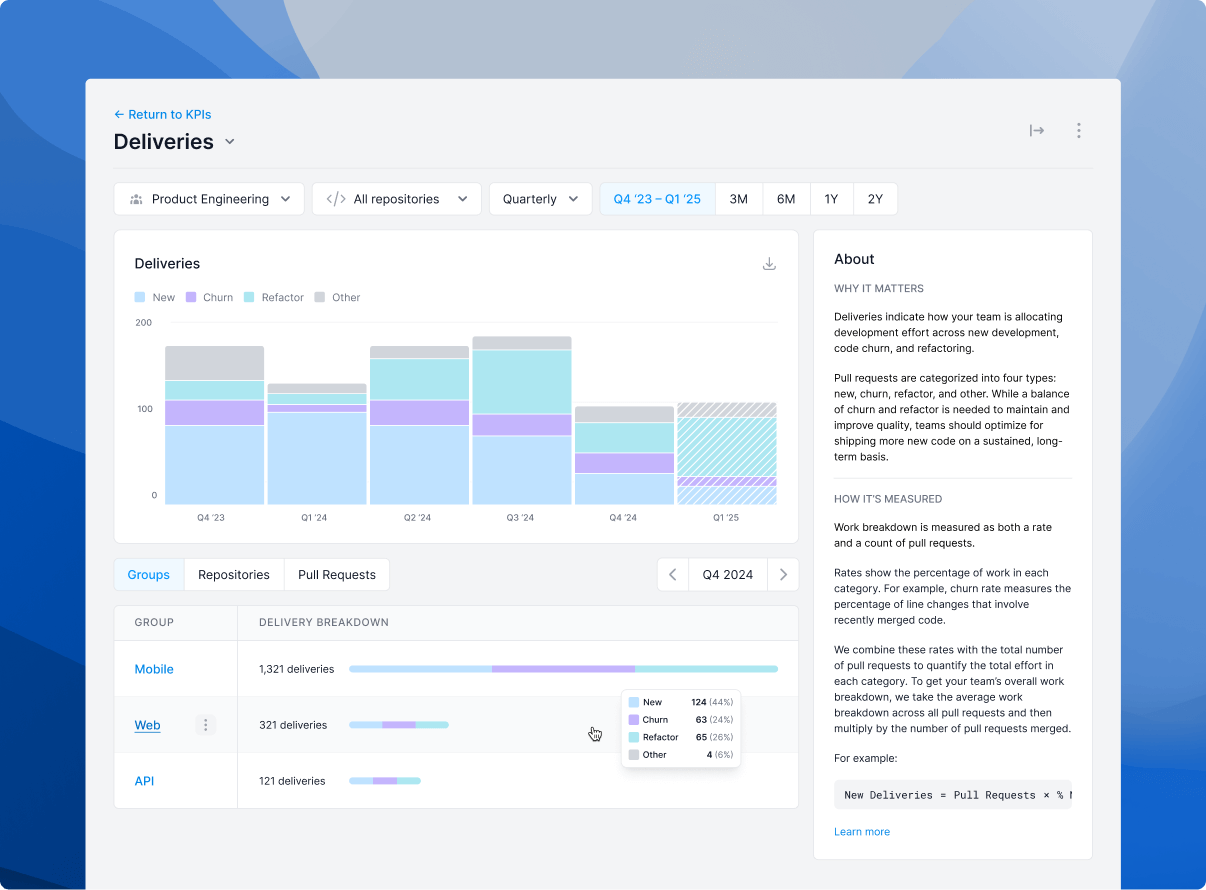
Drilldowns Filtering to a parent group also displays child groups within the group breakdown table, allowing you to more easily compare metrics across groups.
Group Settings You can now assign child groups to a parent group. Parent groups will automatically inherit the members and repositories assigned to child groups.
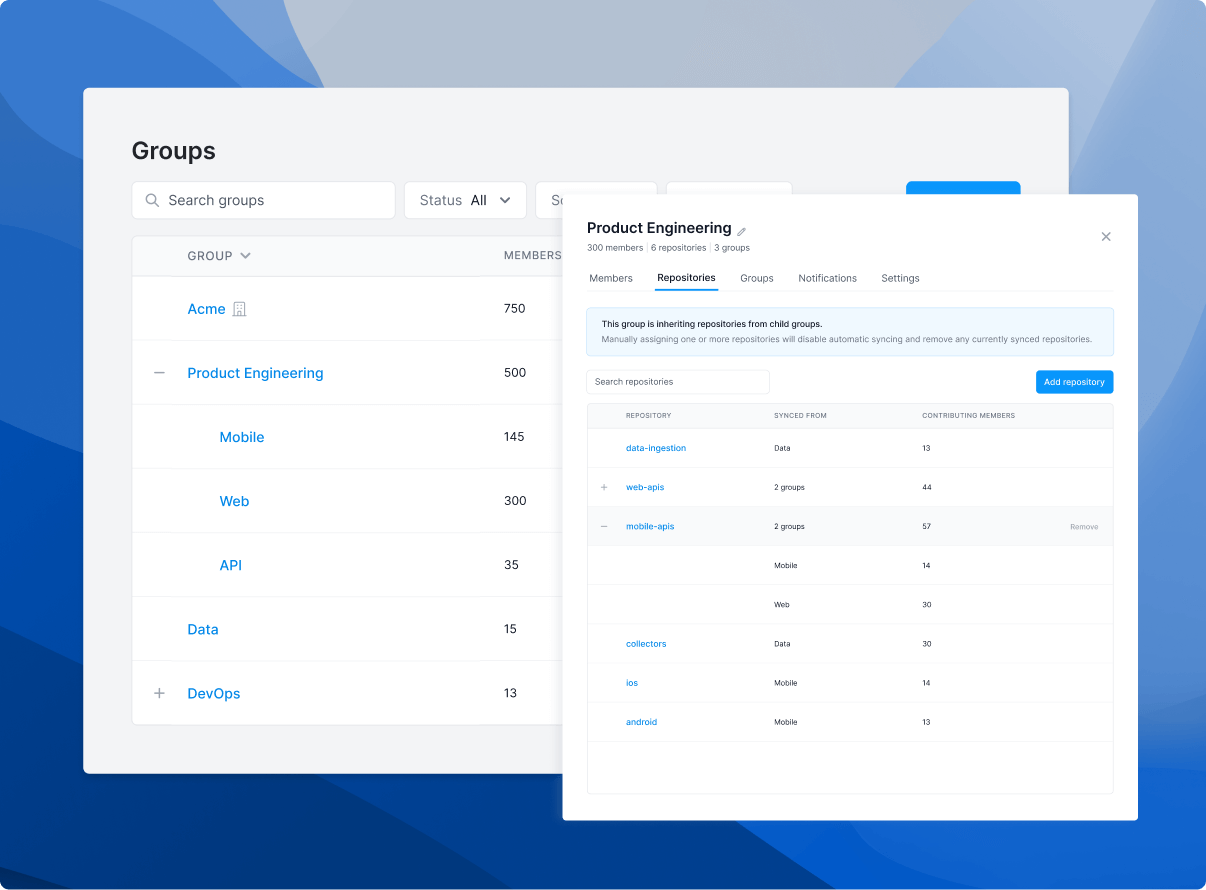
Here’s an example of how it all works:
- You create a group called Product Engineering.
- You add three child groups to Product Engineering: Mobile App, Web App, and APIs.
- Product Engineering inherits the members and repositories assigned to each of the three child groups. That means removing a member or repository from a child group will also remove them from the parent group.
- You can assign additional members directly to Product Engineering (e.g., Managers or Staff Engineers that might oversee all three teams) without affecting child member inheritance.
- If you choose to assign repositories to Product Engineering, repositories will not be inherited from child groups. This allows you to ignore contributions to certain child group repositories that may not be representative of the parent group’s work.
- Members can have multiple membership records. For example, if someone leaves and then rejoins a team, you can set join and departure dates to accurately capture that member’s tenure and contributions on each team.
Child Membership Updates for Imported Groups (GitHub Teams and GitLab Groups)
- Previously, members of a child group were automatically added as direct members to the parent group.
- With this update, child group members are now shown as inherited members of the parent group instead of being added directly.
- To support this change, their former direct memberships were marked as “removed,” which is why they now appear in the Past members list.
- This change will have no effect on your data.
These updates give you more control and visibility into group structures and history—especially useful for large or dynamic teams.
If you have questions, please reach out to us at support@antenna.dev.
🔒 Enhanced Security with Refined User Roles
ReleaseJuly 31, 2025We’ve rolled out an important update to our role-based permissions to give you more control over your organization’s security and settings. These changes are designed to ensure that only Admins can modify critical settings, providing clearer roles and better control over your organization’s workspace.
Here’s a summary of what has changed for the Member role:
- Organization Settings: Members can no longer edit organization-level settings (e.g., display name, industry reference class).
- Git User Management: Members can view the Git Users list, but cannot change user exclusions.
- Strategic Events: Access to the Strategic Events tab is now restricted, unless an Admin has granted access to Comparisons.
- Billing & Connected Apps: The Billing and Connected Apps tabs are now only visible to Admins.
Our updated documentation on roles and permissions can be found here.
As we continue to improve our role-based access controls, these changes will ensure that your organization’s data and settings are secure by default. If you have questions, please reach out to us at support@antenna.dev.
🛠️ Improved Accuracy for Time to Develop Metric
ImprovementJuly 23, 2025We’ve rolled out an enhancement to how we calculate Time to Develop—the time between first commit and pull request opened—giving you a more accurate view of your team’s performance.
This update introduces two key improvements:
- Zero Values: for pull requests with a first commit timestamp after the pull request was opened, we had assigned a Time to Develop of zero. These zero values reduced the average for this metric but are no longer counted in the new release, providing for a more accurate metric.
- More Complete Branch Accounting: some commits in development branches were previously excluded from the Time to Develop calculation. Those commits are now included to provide more complete accounting of this metric.
These edge cases were impacting the metrics. The metrics are now more accurate.
What to expect: You may notice a shift in your Time to Develop and overall Lead Time metrics. Our industry benchmarks have also been updated, reflecting a more precise picture of the software development lifecycle.
➕ Developer Insights for Azure DevOps Users
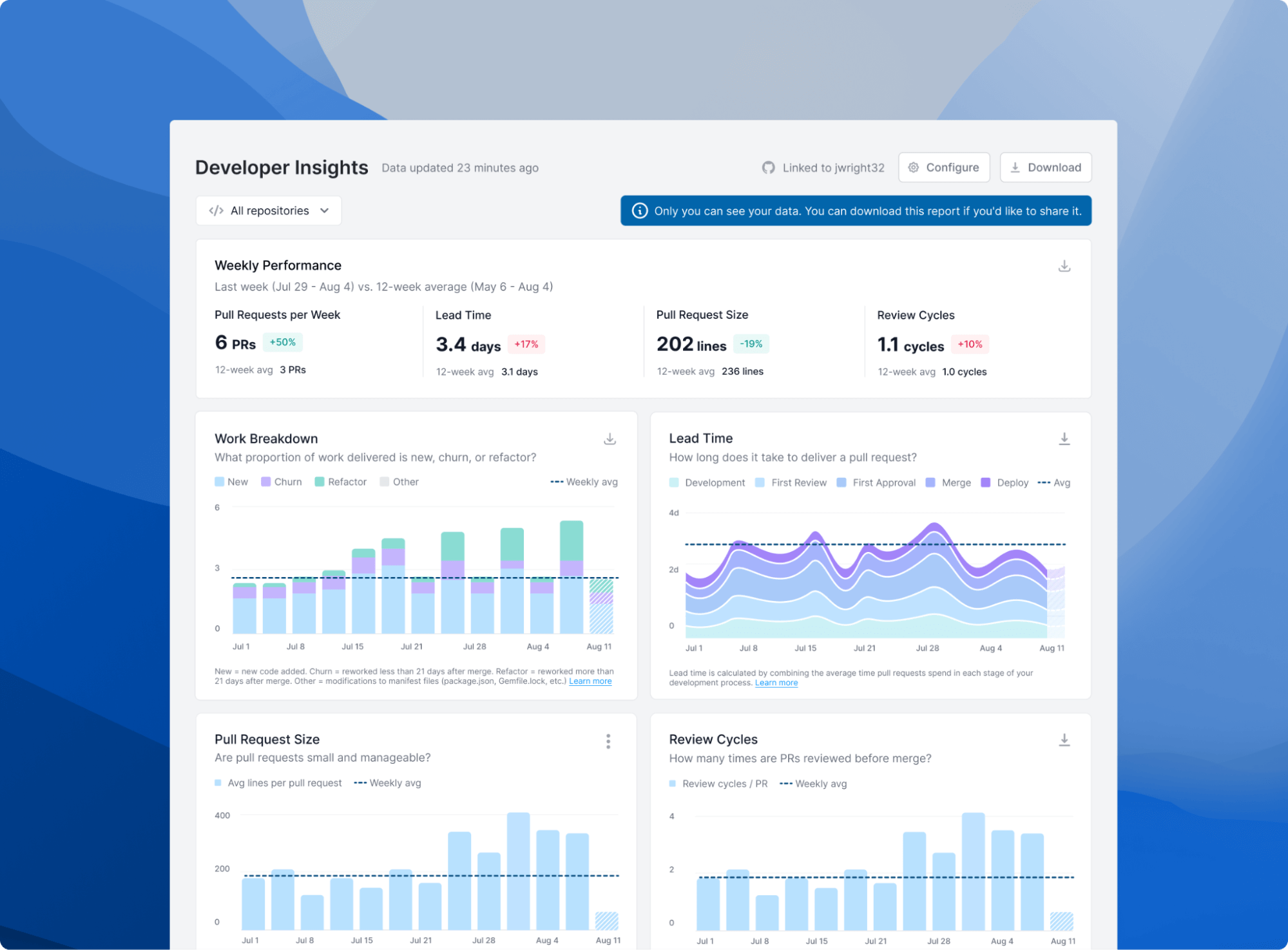
ReleaseJuly 21, 2025We’re excited to announce that our Developer Insights page now supports organizations using Azure DevOps. Previously, this feature was only available for GitHub, Bitbucket, and GitLab (cloud) users.
Developer Insights provides personalized metrics that give you a deeper understanding of your engineering contributions. These insights are designed to help you understand your impact, spot bottlenecks, and continuously improve your development workflow.
Only you can see your Insights page. You can download your report if you’d like to share.
✨ Deployment Report Fixes, Improvements
ImprovementJuly 18, 2025We’ve made a few small improvements and fixes to the Deployments report:
- Refined Slowest and Least Successful Deployments: To provide you with more relevant and timely insights, Slowest Deployments and Least Successful Deployments will now reflect data from the last complete month instead of the last three months.
- Improved Highlights: The 3-month rolling averages no longer include the in-progress period, providing a more accurate representation of historical performance.
- More Accurate Group Representation: When selecting a Git provider group (e.g. a GitHub team), data starts after the group was created, providing a more representative group history. This matches the behavior on newer reports, like the KPI report.
- Time to Deploy Fix: We’ve corrected a discrepancy in Time to Deploy between the Deployments report and KPIs report. This adjustment ensures that the Time to Deploy metric now aligns with the drilldown and KPI views.
- Batch Size Fix: We’ve resolved a bug affecting a small number of teams where line changes may have been counted twice.
If you have questions, please reach out to us at support@antenna.dev.
📣 Weekly Group Email Report Fix
FixJuly 8, 2025We have corrected an issue in the weekly group email report to ensure it consistently displays the most recent week’s data. This resolves a problem where reports sent in May and June inadvertently showed data from a prior week. No other reports were affected.
We have released a fix and added enhanced monitoring to prevent this from happening again. We apologize for any confusion this may have caused.
🚀 Group Membership Improvements
ImprovementJune 26, 2025We’ve made a few important updates to improve groups—including more robust configurations, easier management, and clearer representation of memberships. There is no change to any of your metrics as a result of these changes.
—
New Membership History Set a Join and/or Departure date on a group member to limit their data to a specific window of time. Members with a Departure date can be found under the Past tab under Members.
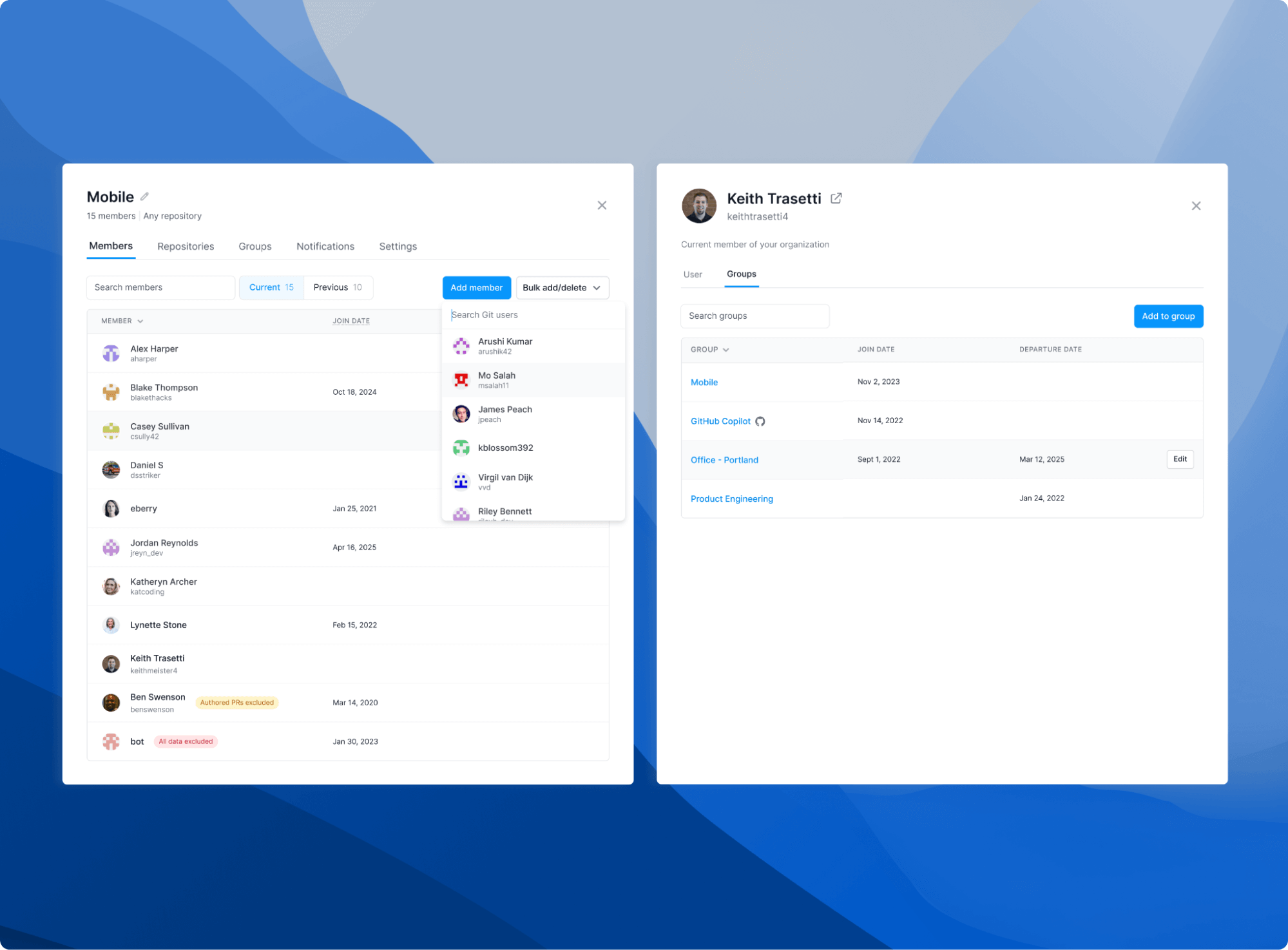
Use this feature to more accurately reflect teams where members are changing over time. You can also exclude data for managers that were previously ICs while retaining the data before they changed roles. To compare AI coding tools, use this feature to limit data for each developer in the group to after they started using the tool.
History of members joining or departing a group is automatically retained for teams synced from your Git provider (e.g. GitHub Teams). You will now see Join and Departure dates displayed for members of these synced groups. There is no change to your metrics as a result of this change, unless you choose to manually modify Join and Departure dates.
Faster, More Efficient Group Management We’ve implemented a faster, more efficient user interface for adding members to groups. You can now add members to groups from the Git Users page.
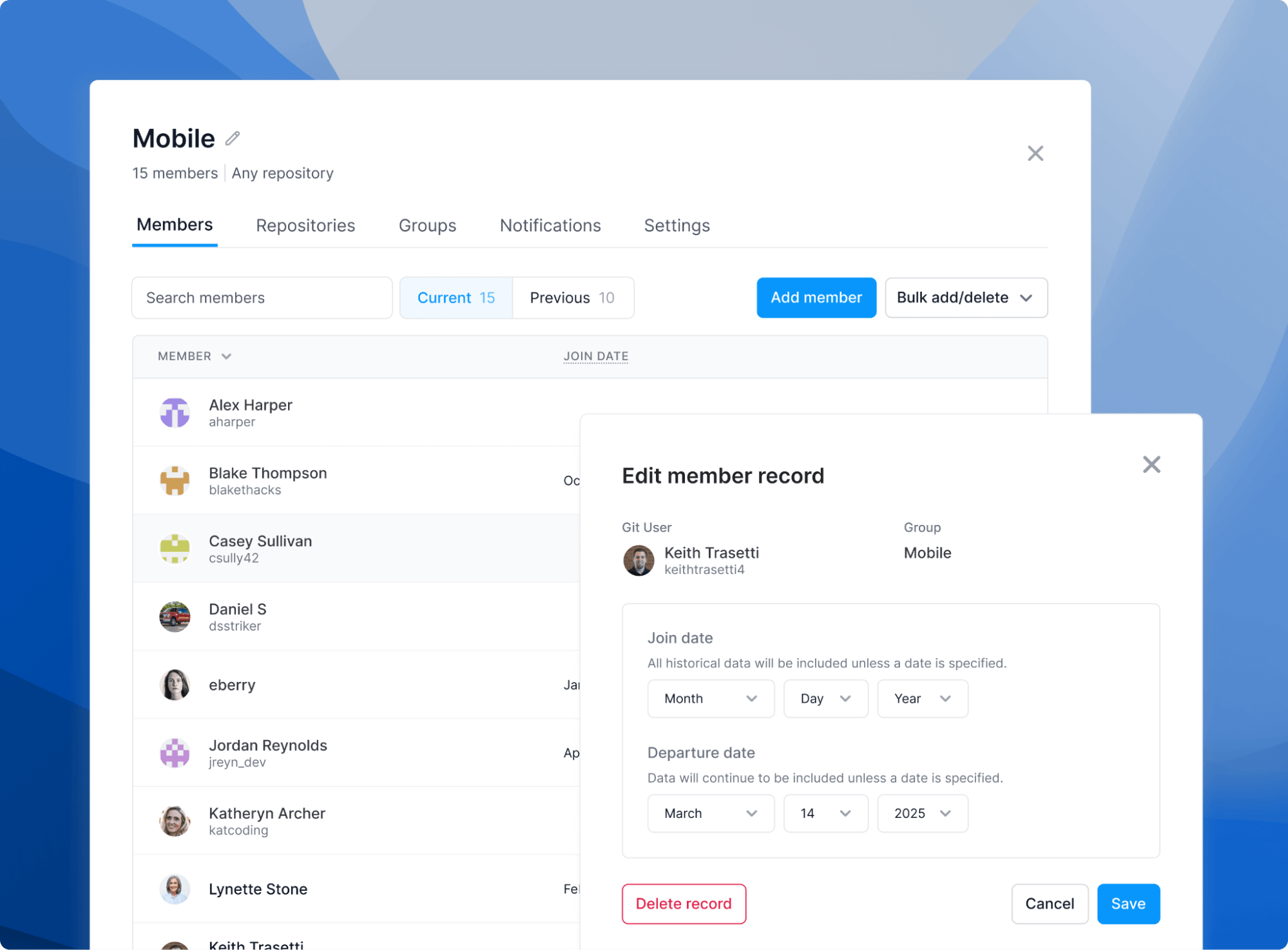
You can add multiple membership records for a single user, spanning different periods of time. Use this feature to capture users that joined, left, and then rejoined a group. There is no change to bulk add or delete members from a group, aside from a small change to the terminology (“delete” vs. “remove”).
Clearer Representation of Group Membership Group membership counts—as shown next to each group for context—have been updated to include Git users marked as excluded (e.g. managers) or bots. Previously, these users were not included in the count.
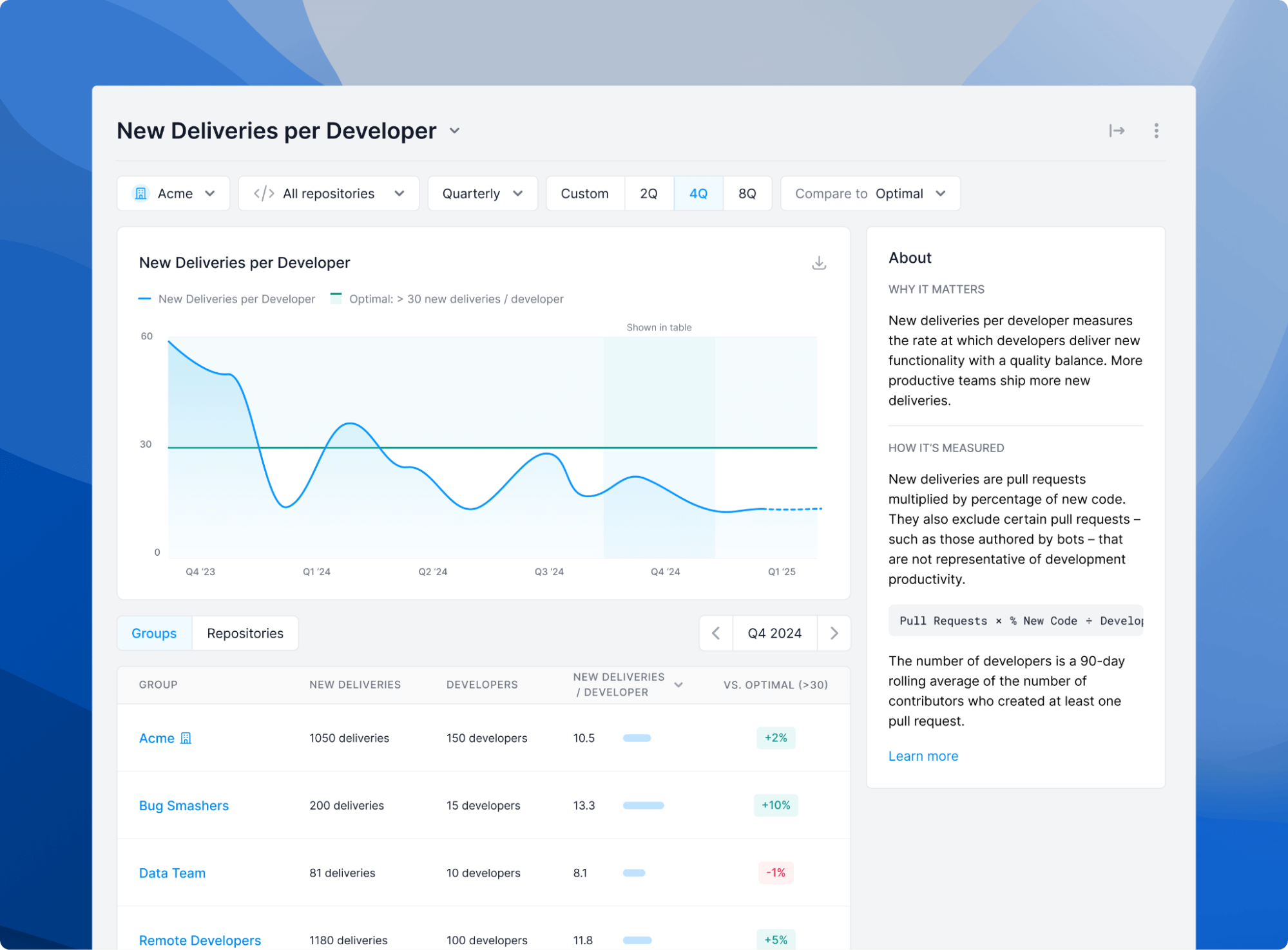
Contextual member counts are no longer displayed for groups in KPIs, Leading Indicators, and Comparisons to avoid confusion. Instead, a count of developers—anyone who created a pull request in the last 90 days—is now shown for metric drilldowns when it is relevant, such as for New Deliveries per Developer, Code Review Participation, and Open Pull Requests per Developer.
As a reminder, you can exclude pull requests created by a user (e.g. managers, product managers, designers, and other Git users outside of engineering). Reviews and approvals from these users will still count towards the progress of your pull requests to preserve accuracy (e.g. calculating Time to Review), but they will not factor into contributor-based metrics (e.g., Developer, Reviewer, and Contributor counts). You can also exclude all pull request activity for a specific user. Their reviews and other pull request activity are not factored into any metrics.
——
These changes aim to provide more accurate data and a more intuitive interface for managing group memberships. If you have questions, please reach out to us at support@antenna.dev.
🎯 Introducing Objectives: Turn Insights into Action
AnnouncementJune 13, 2025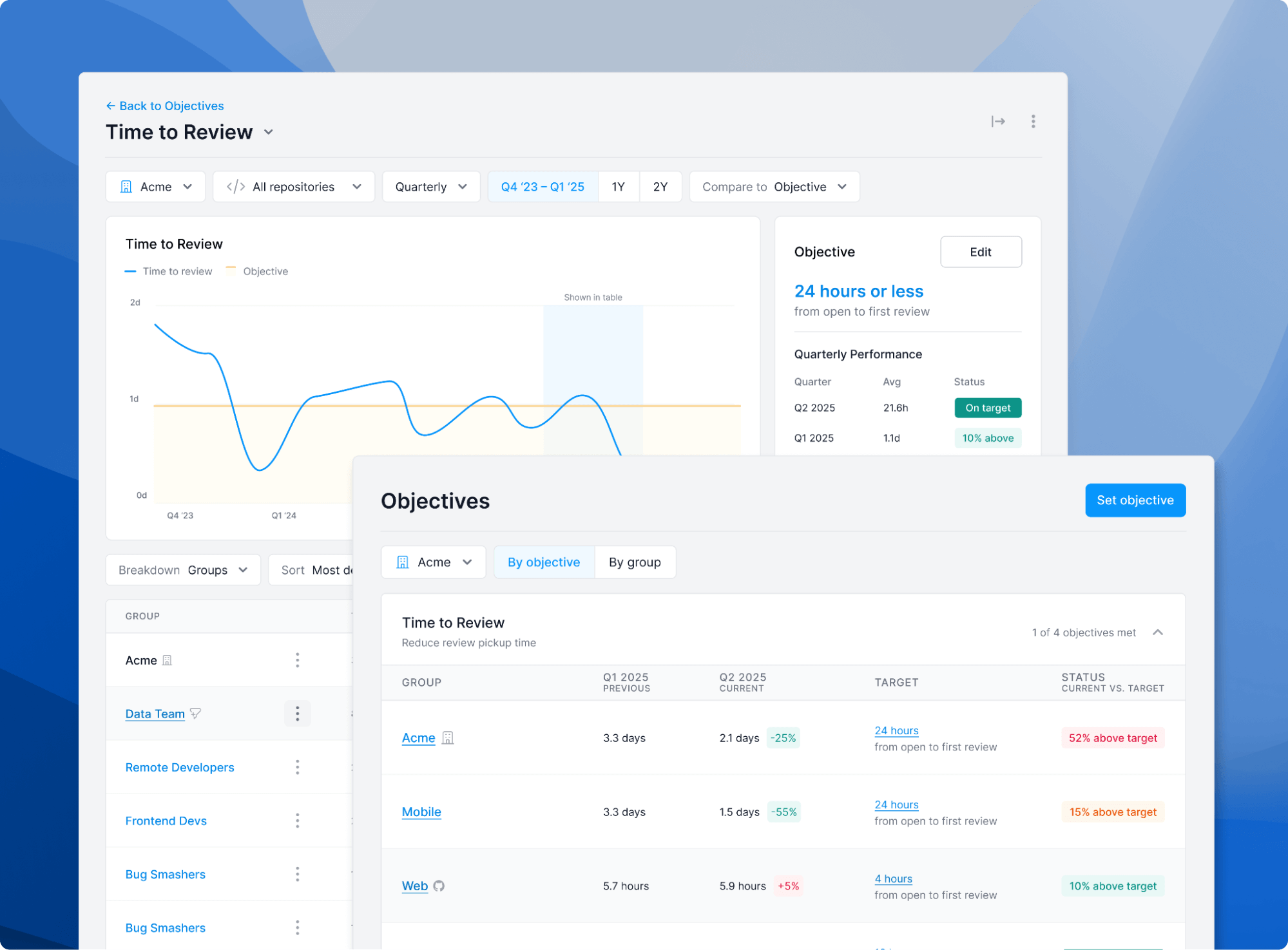
We recently released Leading Indicators to help you identify your top constraint. Now, we’re giving you a powerful way to take action on those insights. Introducing Objectives—a new feature designed to help you set, track, and achieve improvement goals directly against your biggest bottlenecks.
Once you’ve identified your top constraint, you can set a clear, measurable objective against the corresponding Leading Indicator. From there, you can conduct data-driven reviews of your progress with insights on key trends and performance, helping you optimize your efforts and unblock your team.
Objectives create a clear path from actionable inputs (Leading Indicators) to better outcomes (your KPIs). By setting a goal against a specific constraint, you can confidently drive measurable improvements throughout your entire development process.
Ready to set your first objective? Schedule time with us to review your top constraint and define a goal together, or feel free to reach out to us at support@antenna.dev.
✨ Prorated 'Per Developer' Metrics for In-Progress Period
ImprovementJune 1, 2025We’ve refined how our “per developer” metrics are calculated for in-progress periods to provide a more accurate forecast of your team’s performance.
Previously, metrics for the current period could appear deflated because they weren’t adjusted for time. Now, we prorate these values by dividing them by the percentage of the period that has been completed. For example, if your New Deliveries per Developer is 10 halfway through a quarter, the prorated value will now show 20, giving a more accurate projection of the final outcome.
This change applies to normalized productivity metrics:
- New Deliveries per Developer
- Deployments per Developer
Total value metrics like Total Deliveries and Total Deployments are not affected, as they are not normalized. This enhancement ensures you have a clearer, more predictive understanding of team performance as the period unfolds.
📣 Deployment Frequency Fix
FixMay 28, 2025We recently identified and addressed a discrepancy in our Deployment Frequency calculation on the KPIs page. Over the last week (approximately May 20th - May 27th), the metric did not include deployments that exclusively contained pull requests authored by excluded users and bots. This behavior has been changed, providing an accurate count of deployments.
🚀 Git User Improvements
ImprovementMay 23, 2025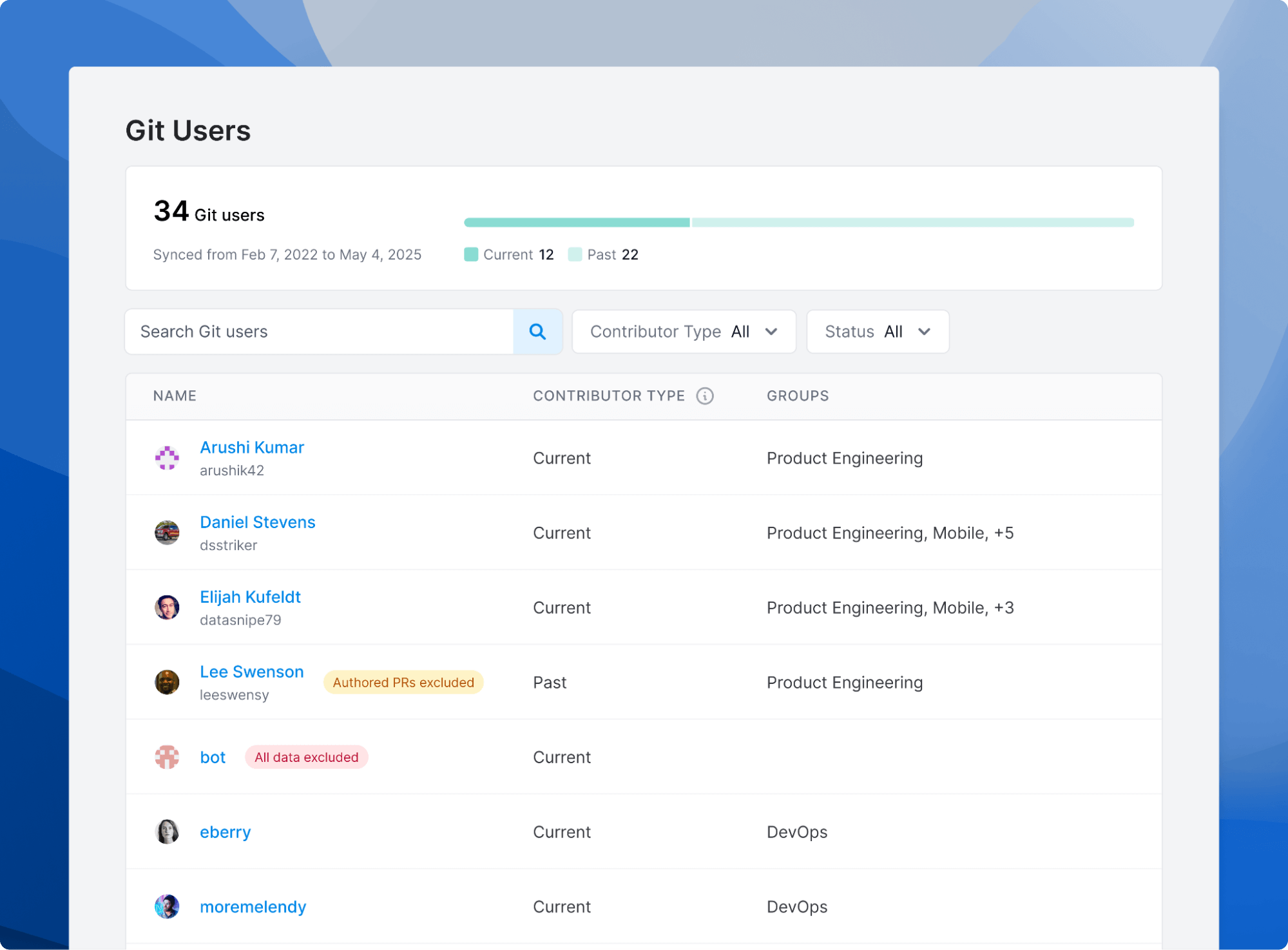
We’ve made several improvements to make it more clear how we track Git users and added support for excluding pull requests created by specific users.
Git Users include anyone in your GitHub, GitLab, Bitbucket, or Azure DevOps organization. You can view a list of Git Users in your organization’s Settings under the Git Users tab.
Git Users include both Current and Past users contributing to repositories in your organization. Past Git Users are included in your historical data.
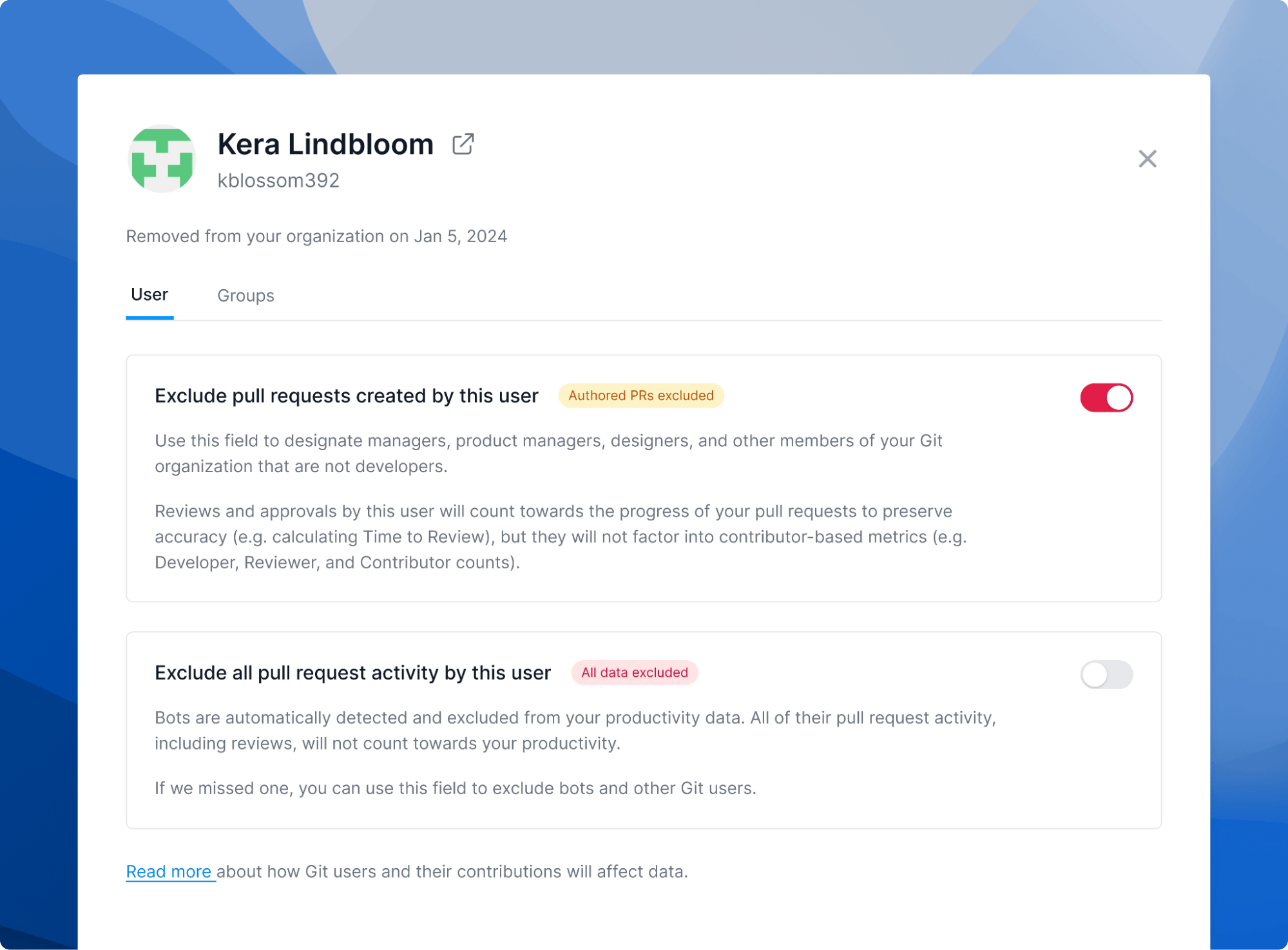
You can manually exclude pull requests created by managers, product managers, designers, and other Git users outside of engineering. Reviews and approvals from these users will still count towards the progress of your pull requests to preserve accuracy (e.g. calculating Time to Review), but they will not factor into contributor-based metrics (e.g., Developer, Reviewer, and Contributor counts).
Pull requests created by bots are automatically excluded from your data. Their reviews and other pull request activity are not factored into any metrics. If we are unable to automatically detect bots in your Git organization, you can manually exclude all pull request activity from those users.
Open source contributors are also automatically excluded from your data. An open source contributor is any user that is not an organization member and only contributes to public repositories.
If you have any questions, please reach out to us at support@antenna.dev.
✨ Excluding Drafts from Lead Time
ImprovementMay 21, 2025To ensure your lead time metrics reflect work that is actively in the review and merge pipeline, we’ve refined how draft pull requests are handled. All stages, including “Time to Approve,” now consistently exclude drafts, giving you a cleaner signal on the efficiency of your active development efforts (note: there is no change to how “Time to Review” is calculated, which still starts when a pull request is opened or marked as ready for review).
These updates are designed to give you a truer, more actionable understanding of your team’s development velocity. If you have any questions, please reach out to us at support@antenna.dev.
🧭 Leading Indicators
AnnouncementApril 21, 2025We’ve released Leading Indicators—actionable data to help you identify and unblock your top constraint.
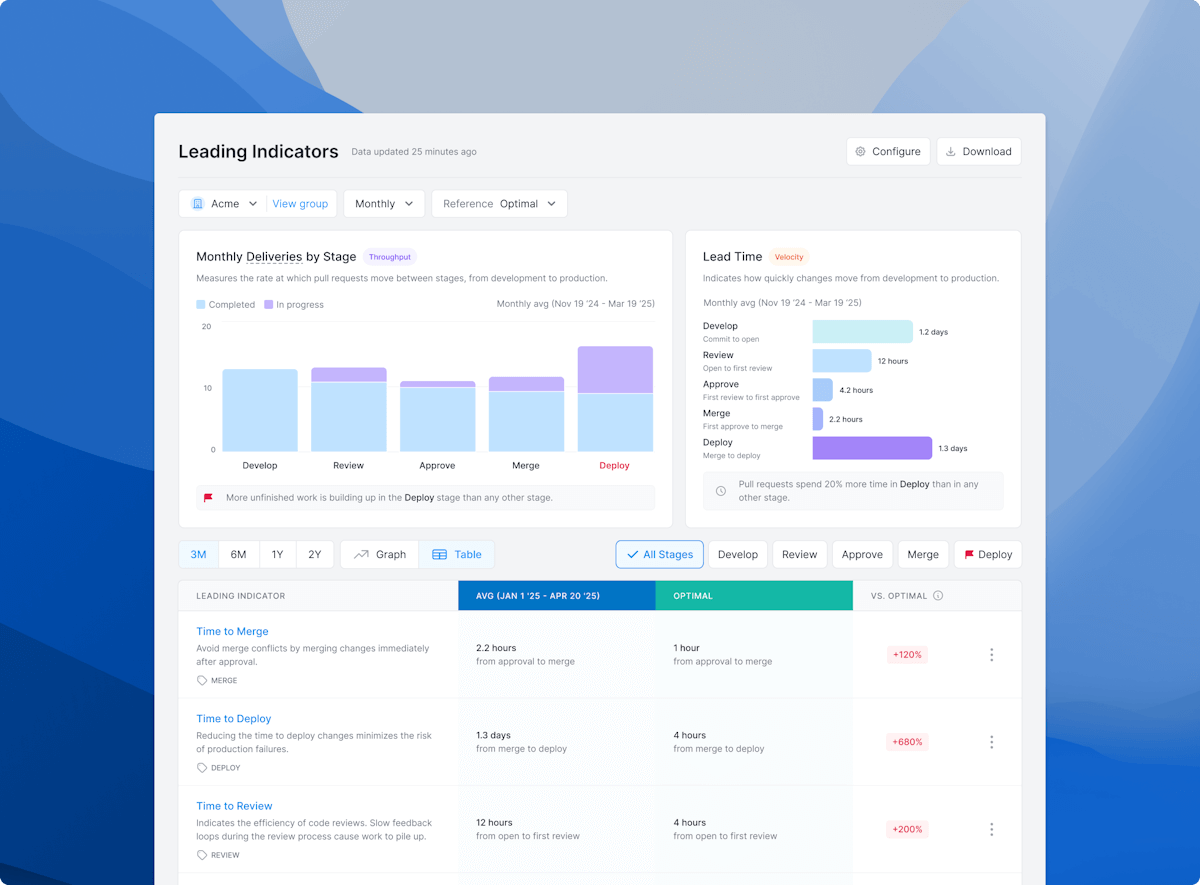
Antenna is divided into KPIs and Leading Indicators. Whereas KPIs are lagging metrics that focus on results and outcomes, leading indicators focus on inputs and actions, predicting future performance and trends.
Leading Indicators are designed to be actionable, helping you quickly pinpoint the biggest constraint in your development process. We highlight one high-impact area at a time, making it easy for you to take action without being buried in dashboards or noise.
Constraints vary by team and shift over time. Schedule time with us to review and identify your top constraint together, or feel free to reach out to us at support@antenna.dev.
🚀 New KPIs Report
ReleaseApril 16, 2025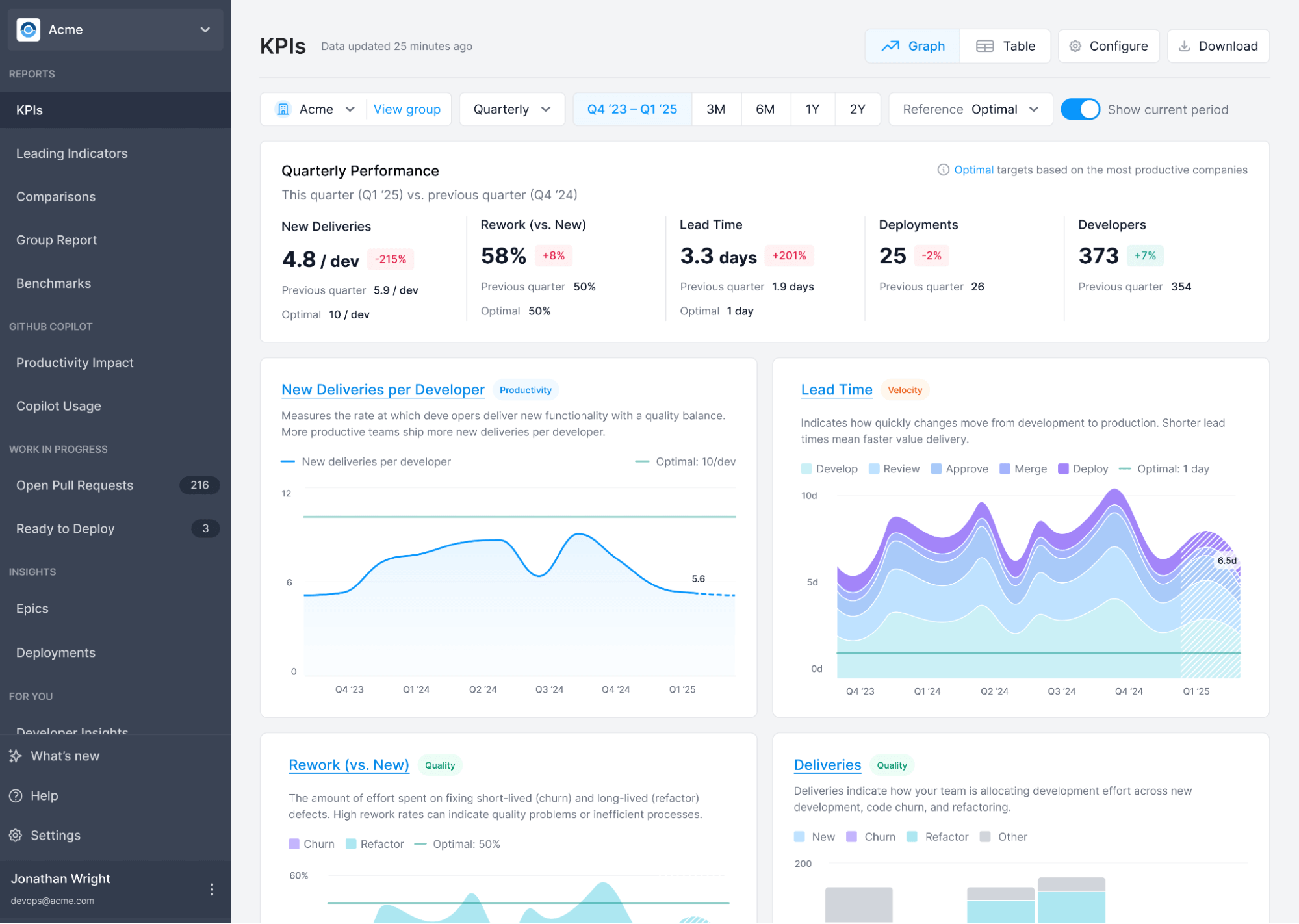
Our new KPIs report automates the most important metrics for development teams, such as New Deliveries, Rework (vs. New), Deployments, and Lead Time.
The KPIs report features several notable improvements vs. our previous reports:
- Improved terminology: we’ve updated the name of the “Features” metric to “New Deliveries” to avoid confusion with project management terminology. This change is purely naming-related and does not impact how the metric is calculated or displayed.
- Optimal values: based on data for over 700K developers and 10K companies, we’ve added optimal values for New Deliveries per Developer, Rework, and Lead Time.
- Deployments: if you’ve configured deployment methods for your repositories, you will see Deployments per Developer on your KPI report.
- Improved filtering controls: you can filter down to any group or any time period. You can also adjust the granularity to weekly, monthly, or quarterly or view as a table instead of graphs for easier reporting.
If you have any questions, feel free to reach out to us at support@antenna.dev.
⚡ Improved terminology
ImprovementFebruary 26, 2025We’ve updated the name of the “Features” metric to “New Deliveries” to avoid confusion with project management terminology. This change is purely naming-related and does not impact how the metric is calculated or displayed.
📐 Improved work breakdown algorithms
ImprovementFebruary 7, 2025We’re making an adjustment to improve the accuracy of our data — specifically, how we track the amount of code that is New, Churn, and Refactor. These updates provide a more accurate view of changes over time, especially for teams that ship new code iteratively.
You may see adjustments to your metrics and benchmarks—most notably, an increase in New Units per Developer (formally Features per Developer) and a higher percentage of pull requests categorized as New. Since these improvements apply to historical data as well, your data will be uniformly adjusted upward, maintaining all relative differences and trends.
By tracking a more detailed history of file line changes—including both their original position and where they appear after edits—we are now more precisely differentiating between newly written code and modifications to existing work. This added granularity gives a more refined view of how code evolves over time, ensuring that new work is accurately captured and modifications are correctly attributed.
You can learn more about how pull requests are categorized in our New, Churn, and Refactor article. If you have any questions, feel free to reach out to us at support@antenna.dev.
➗ Improved algorithms
ImprovementJanuary 7, 2025We’ve updated our algorithms to more precisely track your lead time and productivity metrics.
-
Lead Time Stages
Lead Time is incrementally updated when a PR completes a stage, rather than waiting for the PR to complete all stages. For instance:
- Previously, Time to Review was updated after a PR was merged.
- Now, Time to Review is updated when a PR is reviewed.
This change ensures that your Lead Time metrics are more timely and reflect an ongoing historical trend.
-
Excluded Pull Requests
Our algorithm automatically excludes pull requests that are not representative of development productivity, such as those authored by bots and backmerges from main. We also exclude pull requests that are part of your release process (e.g. promoting changes from a release branch to main). We’ve refined our algorithm to more precisely detect these pull requests, such as by detecting re-used branches. Depending on your development process, you may notice a slight increase in your pull request metrics.
If you have any questions about how our algorithms work, feel free to reach out to us at support@antenna.dev.