Claude Code
Antenna automatically tracks AI coding metrics from Claude Code. Get insight into adoption, activity, and the impact of Claude Code on your team’s productivity.
Connection Methods
We support Claude.ai Enterprise, Claude.ai Team subscriptions, Claude Developer Platform (API) accounts, and self-hosted deployments. You can connect one or more of the following:
- Claude.ai Enterprise – For organizations on a Claude.ai Enterprise plan. Connect using an Analytics API key.
- Claude.ai Team – Team members log in with their Claude.ai subscriptions, including Pro, Max, and Team.
- Claude Developer Platform – Claude Code is managed through an organization with shared API billing on platform.claude.com. Usage analytics are tracked via Claude Code’s Analytics API .
- Self-Hosted Claude Code – Claude Code is hosted on AWS Bedrock. Usage data is read from Model Invocation Logging in S3.
Method 1: Claude.ai Enterprise
For organizations on a Claude.ai Enterprise plan, connect using an Analytics API key to pull usage data directly from Anthropic’s Claude Enterprise Analytics API .
Create an Analytics API key
Go to claude.ai/analytics/api-keys , enable public API access, and create a new API key with the read:analytics and read:spend_limits scopes. You must be a Primary Owner of your Claude.ai Enterprise organization — Anthropic allows no other role to enable API access or create these keys.
Add your API key to app.antenna.dev
Go to Settings > Sources > Add source, find Claude Code, click Connect, select Claude Enterprise, paste in your Analytics API key, and save.
The Analytics API key is different from standard Claude API keys. It provides read-only access to organization-level usage analytics.
The read:spend_limits scope lets us read the spend limits set for each of your users. A key without it still collects usage and cost data, but we cannot report on spend limits and a warning appears under Settings > Sources. Update your key to include both scopes to clear it.
A few limits come from Anthropic’s API rather than Antenna:
- Data starts on January 1, 2026 — earlier activity is not available.
- Engagement and adoption data lands with roughly a one-day lag, so today’s usage appears tomorrow.
- Cost figures can be revised for up to 30 days as Anthropic reconciles late usage.
- Claude Code used through Amazon Bedrock is not reported by this API. Connect Self-Hosted Claude Code for that usage.
For authentication details, scopes, and endpoint reference, see Anthropic’s Analytics APIs and Create an Admin API key documentation.
Method 2: Claude.ai Team
We use OpenTelemetry to track usage from Claude.ai subscriptions (Pro, Max, and Team).
Copy settings.json
On app.antenna.dev, go to Settings > Sources > Claude Code and copy the snippet.
{
  "env": {
    "CLAUDE_CODE_ENABLE_TELEMETRY": "1",
    "OTEL_METRICS_EXPORTER": "otlp",
    "OTEL_EXPORTER_OTLP_PROTOCOL": "http/json",
    "OTEL_EXPORTER_OTLP_METRICS_ENDPOINT": "https://app.antenna.dev/api/v1/otel/claude/metrics",
    "OTEL_EXPORTER_OTLP_HEADERS": "Authorization=Bearer your_token",
    "OTEL_METRIC_EXPORT_INTERVAL": "3600000"
  }
}
Update Claude Managed settings (settings.json)
The settings are at Organization Settings > Claude Code . Paste in the JSON payload and click Update Settings.
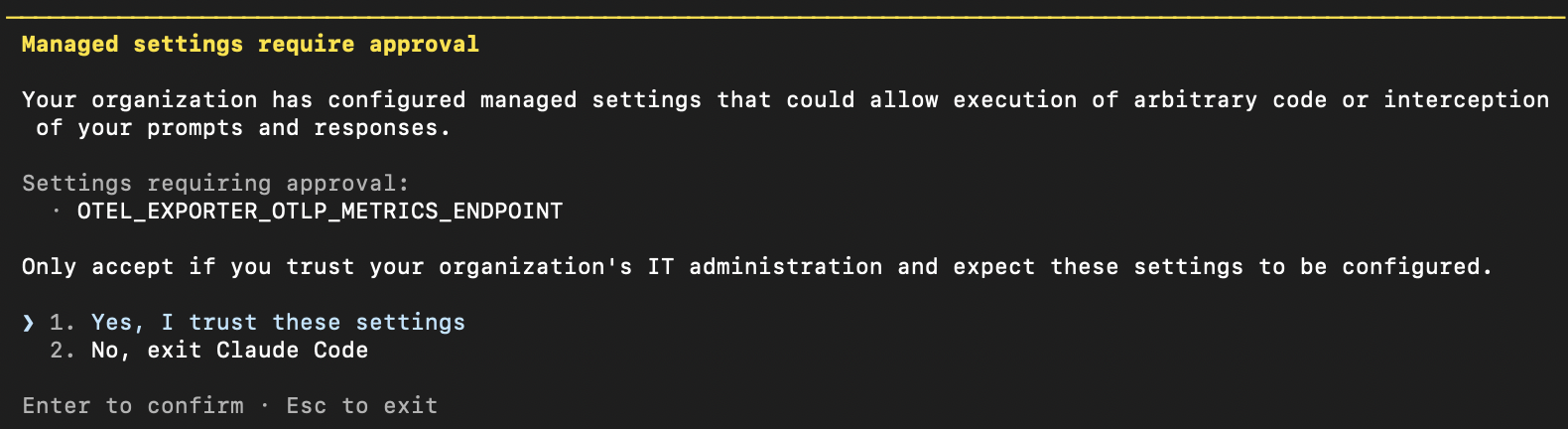
When developers log into Claude with their subscription via their Terminal they will see a notification: “Managed settings require approval”. Users must accept these settings to use Claude. This will update the ~/.claude/settings.json file in each user’s home directory.
Other important notes:
- You must be an Owner to update managed settings.
- If you have your own OpenTelemetry collector or have already set up a
.claude/settings.jsonin the repo with OpenTelemetry configured, managed settings will supersede it. Keep this in mind if you or your team have an existing repo-level OpenTelemetry configuration. - This setting only tracks Claude Code usage.
- For more detail on how to configure your settings file, see Claude Code settings .
There are various options for propagating settings.json (e.g. MDM / device management, dotfiles repository, shell profile / RC files, and onboarding scripts). If available, MDM / device management is the most reliable method for org-wide enforcement.
Upload your actual costs
Claude.ai Team, Pro, and Max plans have no usage or billing API, so the cost that OpenTelemetry reports is Claude Code’s own estimate. Upload your actual spend per member and Antenna uses it as the actual cost for that month instead of the estimate.
Export the spend report from Claude.ai
An Owner or Primary Owner exports it from Settings > Analytics on claude.ai: scroll to How much is Claude costing? and click Export spend report. Choose Last Month, or a custom range covering a single calendar month — the report sums spend over the whole range it is given, so a range spanning several months cannot be attributed to any one of them. Upload one export per month.
Upload it in Antenna
On app.antenna.dev, go to Settings > Sources, click Configure on the Claude source, then click Upload costs (CSV). Pick the month the export covers and drop in the file as it comes from claude.ai — no editing required.
The export has one row per member, per product, per model. Antenna keeps its Claude Code rows, so spend on Chat, Cowork and the Office agents does not inflate Claude Code’s cost, and sums each member’s remaining rows into one monthly cost using Total Net Spend USD, the amount after any discounts or credits.
Members are matched by email to the Claude Code user reporting OpenTelemetry metrics; anyone who has not sent metrics yet is reported as unmatched.
Or build the CSV yourself
Any CSV with a member email, a month and a cost works, which is the simpler route if your spend numbers come from somewhere other than the Claude.ai export:
Email,Month,Cost
alex@acme.com,2026-06,142.50
jordan@acme.com,2026-06,87.25
Headers are matched case-insensitively and accept common aliases (e.g. Email Address,
Billing Month, Amount). A Month column overrides the month picked in the upload modal, and
rows repeated for the same member and month are summed. The modal links an example CSV.
Each month’s cost is spread across that member’s Claude Code usage in the month in proportion to their estimated cost, so daily and weekly views stay consistent with the monthly total. Upload a month again at any time — the newest upload for a member and month replaces the previous one.
Method 3: Claude Developer Platform
To connect your Claude Developer Platform (API) account:
Create an Admin API key
Organization admins can create Admin API keys in the Claude console.
Add your Admin API key to app.antenna.dev
Go to Settings > Sources > Add source, find Claude Code, click Connect, paste in your Admin API key, and save the configuration.
This integration uses the Admin API. You must use an Admin API key (keys start with sk-ant-admin...), which is different from standard Claude API keys. Standard API keys cannot access the usage report or organization users endpoints. Only organization members with the admin role can create Admin API keys.
Method 4: Self-Hosted Claude Code
If Claude Code runs on AWS Bedrock, Antenna can read usage data directly from Model Invocation Logging in S3. This requires no changes to your Claude Code deployment — Antenna assumes an IAM role in your account and reads the invocation logs from your S3 bucket.
Prerequisites
- An AWS account running Claude Code on Amazon Bedrock
- Model Invocation Logging enabled and configured to write to an S3 bucket
- IAM permissions to create policies and roles
Model Invocation Logging must be enabled in your Bedrock settings before Antenna can read usage data. Go to Amazon Bedrock > Settings > Model invocation logging and configure an S3 destination.
Setup
Get your External ID
On app.antenna.dev, go to Settings > Sources > Claude Code > Connect. Find the Self-Hosted Claude Code method and copy the External ID.
Create an IAM policy
In your AWS account, create an IAM policy that grants read access to the S3 bucket where Bedrock writes invocation logs.
Bedrock Model Invocation Logging identifies users by the identity ARN in each invocation event (e.g. arn:aws:sts::123456789012:assumed-role/RoleName/session-name). If your developers assume IAM roles with unique session names, Antenna can automatically identify individual users.
- Go to IAM > Policies > Create policy.
- Select the JSON tab and paste the following, replacing
YOUR_BUCKET_NAMEwith the bucket where Bedrock writes invocation logs.
{
  "Version": "2012-10-17",
  "Statement": [
    {
      "Effect": "Allow",
      "Action": [
        "s3:GetObject",
        "s3:ListBucket"
      ],
      "Resource": [
        "arn:aws:s3:::YOUR_BUCKET_NAME",
        "arn:aws:s3:::YOUR_BUCKET_NAME/*"
      ]
    }
  ]
}- Name the policy (e.g.,
Antenna-Bedrock-ReadOnly) and create it.
Create an IAM role
Create an IAM role that allows Antenna to read from your S3 bucket. The trust policy below grants access to arn:aws:iam::134217665810:role/software-app-prod, which is the IAM role managed by Antenna.
- Go to IAM > Roles > Create role.
- Select Custom trust policy and paste the following, replacing
YOUR_EXTERNAL_IDwith the value from Step 1:
{
  "Version": "2012-10-17",
  "Statement": [
    {
      "Effect": "Allow",
      "Principal": {
        "AWS": "arn:aws:iam::134217665810:role/software-app-prod"
      },
      "Action": "sts:AssumeRole",
      "Condition": {
        "StringEquals": {
          "sts:ExternalId": "YOUR_EXTERNAL_ID"
        }
      }
    }
  ]
}- Click Next and attach the policy you created in the previous step.
- Name the role (e.g.,
Antenna-Bedrock-Role) and create it. - Copy the Role ARN from the role summary page.
Connect in Antenna
Back on app.antenna.dev, enter the following on the Model Invocation Logging (AWS Bedrock) setup page:
- Role ARN — the ARN of the IAM role you just created
- Region — the AWS region where Bedrock is configured (e.g.
us-west-2) - S3 Bucket Name — the bucket where Model Invocation Logging writes data
- S3 Prefix (optional) — if you configured a prefix in your Bedrock logging settings, enter it here
Click Connect to save. Antenna will begin reading invocation logs and data will appear within an hour.
How it works
Bedrock Model Invocation Logging writes a gzipped JSON file to S3 for each invocation. These files are organized by date under a path like:
s3://YOUR_BUCKET/AWSLogs/ACCOUNT_ID/BedrockModelInvocationLogs/REGION/YYYY/MM/DD/Each file contains one JSON object per line (NDJSON format) with fields including:
timestamp— when the invocation occurredidentity.arn— the identity ARN of the caller (used for user identification)modelId— the Bedrock model usedinput.inputTokenCountandoutput.outputTokenCount— token usage
Antenna reads these files daily, aggregates token usage per user, and surfaces the data in your AI dashboards. Users are identified by their identity ARN — if your developers assume IAM roles with unique session names (e.g. arn:aws:sts::123456789012:assumed-role/DeveloperRole/jane.smith), Antenna will automatically create a user for each unique session name.
Sanitizing sensitive prompt data
If your Model Invocation Logging configuration includes request or response body content (for example, prompts), you can deploy sanitize-lambda in your AWS account to process invocation logs and remove that sensitive data from the logged payloads.
Antenna does not require request or response bodies for usage analytics. Only the metadata fields listed in Data collected below are processed.
Alternative: S3 Replication (Push)
If your organization prefers not to grant Antenna cross-account IAM role access, you can use S3 Cross-Account Replication instead. In this model, your S3 bucket automatically pushes data into a dedicated Antenna-managed bucket. Antenna never accesses your account, and you never access Antenna’s account — replication is handled entirely by AWS’s S3 service internally.
This is a push model — you stay in full control and can disable replication at any time by deleting the replication rule. Replication only applies to new objects going forward. If historical data needs to be ingested, a separate S3 Batch Replication job can be run as a one-time backfill.
What you need
- Admin access to your AWS account
- The Destination Bucket ARN and AWS Account ID provided by Antenna
Replication setup
Enable versioning on your source bucket
S3 Cross-Account Replication requires versioning on the source bucket.
- Go to S3 > your source bucket > Properties.
- Under Bucket Versioning, click Edit and select Enable.
- Click Save changes.
Enabling versioning may slightly increase your S3 storage costs, as AWS retains previous versions of objects.
Create a replication IAM role
Create an IAM role in your account that allows S3 to replicate objects to Antenna’s destination bucket.
- Go to IAM > Roles > Create role.
- Select Custom trust policy and paste the following:
{
  "Version": "2012-10-17",
  "Statement": [
    {
      "Effect": "Allow",
      "Principal": {
        "Service": "s3.amazonaws.com"
      },
      "Action": "sts:AssumeRole"
    }
  ]
}- Click Next, then Create policy and paste the following inline policy. Replace
YOUR_SOURCE_BUCKETwith your bucket name andANTENNA_DESTINATION_BUCKET_ARNwith the ARN provided by Antenna:
{
  "Version": "2012-10-17",
  "Statement": [
    {
      "Effect": "Allow",
      "Action": [
        "s3:GetReplicationConfiguration",
        "s3:ListBucket"
      ],
      "Resource": "arn:aws:s3:::YOUR_SOURCE_BUCKET"
    },
    {
      "Effect": "Allow",
      "Action": [
        "s3:GetObjectVersionForReplication",
        "s3:GetObjectVersionAcl",
        "s3:GetObjectVersionTagging"
      ],
      "Resource": "arn:aws:s3:::YOUR_SOURCE_BUCKET/*"
    },
    {
      "Effect": "Allow",
      "Action": [
        "s3:ReplicateObject",
        "s3:ReplicateDelete",
        "s3:ReplicateTags"
      ],
      "Resource": "ANTENNA_DESTINATION_BUCKET_ARN/*"
    }
  ]
}- Name the role (e.g.,
Antenna-S3-Replication-Role) and create it.
Create a replication rule
- Go to S3 > your source bucket > Management > Replication rules > Create replication rule.
- Give the rule a name (e.g.,
Antenna-Replication). - Under Source bucket, scope the rule to the appropriate prefix for your data (e.g.,
AWSLogs/for Bedrock invocation logs orq-developer-user-data/for Amazon Q usage data). - Under Destination, select Specify a bucket in another account, and enter the Account ID and Destination Bucket ARN provided by Antenna.
- Select the IAM role you created in the previous step.
- Click Save.
Verify replication
After creating the rule, new objects written to your source bucket under the configured prefix will automatically replicate to Antenna’s bucket. You can verify replication status in the S3 > Management > Replication rules section of your bucket.
Backfill historical data with S3 Batch Replication (one-time, optional)
The replication rule created above only applies to new objects going forward. To replicate existing objects that were written before the rule was created, run a one-time S3 Batch Replication job.
- Go to S3 > your source bucket > Management > Replication rules.
- Select the replication rule you created in the previous step, then choose Create Batch Replication job.
- Under Batch manifest, select Generate manifest to let S3 automatically identify all eligible existing objects, or provide your own manifest using an S3 Inventory report or CSV file.
- Under Batch replication filters, set the replication status filter to Not replicated to target only objects that have never been replicated.
- Choose a destination for the Completion report so you can verify the results after the job finishes.
- For the IAM role, select the same replication role you created earlier (e.g.,
Antenna-S3-Replication-Role). - Review the job details and choose Create job. The job starts in a Ready state — select the job and choose Run job to begin replication.
- Monitor progress in S3 > Batch Operations. Once complete, review the completion report to confirm all objects replicated successfully.
S3 Batch Replication is a one-time operation. You only need to run this once to backfill historical data. All future objects are handled automatically by the live replication rule.
Data collected
Claude.ai Enterprise
We pull organization-level and per-user usage and cost analytics from the Anthropic Analytics API.
| Purpose | Endpoint |
|---|---|
| Usage analytics | GET https://api.anthropic.com/v1/organizations/analytics/users |
| Per-user usage | GET https://api.anthropic.com/v1/organizations/analytics/user_usage_report |
| Per-user cost | GET https://api.anthropic.com/v1/organizations/analytics/user_cost_report |
Claude.ai Team / Pro / Max (OpenTelemetry)
We receive metrics every hour, such as lines added, commits, pull requests, tokens, and related usage. For full details on what Claude Code sends, see Monitoring usage in Claude Code’s OpenTelemetry documentation.
We do not collect logs (for example, prompts). Only aggregated metrics are sent.
Self-Hosted Claude Code (AWS Bedrock — Model Invocation Logging)
For Bedrock deployments, Antenna reads Model Invocation Logging data from your S3 bucket. Each invocation log contains:
- Timestamp, model ID, and API operation
- Input and output token counts
- Identity ARN (used to identify individual users)
- Cache token usage (creation and read)
Antenna does not read the request or response body content. Only the metadata fields listed above are processed. All data stays in your AWS account — Antenna reads it via a cross-account IAM role with read-only S3 access.
Claude Developer Platform
We pull from two Anthropic API endpoints:
| Purpose | Endpoint |
|---|---|
| Usage and productivity | GET https://api.anthropic.com/v1/organizations/usage_report/claude_code |
| Organization users (team list) | GET https://api.anthropic.com/v1/organizations/users |
We use the organization users response to match Claude users to Git users. For full parameter and response details, see Claude Code Analytics API and Administration API .